
WMS vs. Inventory Management System: What’s the Difference and Which Do You Need?
“Do we need a WMS, or just better inventory management?” It sounds like a software question, but it is really a question about where your problems are: in knowing what you have, or in moving it through the building.
An inventory management system tells you what you own, where it is, and when to buy more. A warehouse management system (WMS) directs the people who receive, put away, pick, pack, and ship it. The two overlap, vendors use the terms loosely, and many companies buy one when they needed the other.
This guide explains the difference between a WMS and an inventory management system, where they overlap, which one your operation needs, the signs you have outgrown inventory-only software, and where ERP fits.
What Each System Does
What is an inventory management system?
An inventory management system (sometimes shortened to IMS) keeps the record of your stock: quantities on hand, on order, and committed to customers; which location each item is in; and what it cost. It is the system purchasing and sales rely on to decide what to buy and what to promise. Typical functions include:
- On-hand, available, committed, and on-order quantities by item and location
- Reorder points, safety stock, and replenishment suggestions. See the reorder point formula and safety stock formula.
- Transfers between warehouses or branches
- Lot, serial, and expiration tracking
- Inventory valuation and costing. See inventory costing methods.
- Reporting on turnover, aging, and slow-moving stock. See inventory turnover.
What is a warehouse management system?
A warehouse management system manages the physical work of the warehouse. Where an inventory system knows an item is “in the Dallas warehouse,” a WMS knows it is in bin C-14-03, on a specific pallet, and tells a picker to go get it. Typical functions include:
- Bin, zone, and pallet-level locations, often with license plate numbers (LPNs)
- Barcode receiving and directed put-away
- Picking methods such as discrete, batch, and wave picking. See warehouse picking methods.
- Pack verification and shipping, with carrier integrations
- Cycle counts and inventory moves from mobile devices. See cycle counting.
- Cross-docking and staging
For a deeper look at WMS functionality and how to evaluate it, see our WMS buyer’s guide.
WMS vs. Inventory Management at a Glance
| Inventory management system | Warehouse management system | |
|---|---|---|
| Main question | What do we have, where, and what is it worth? | How do we move it through the building accurately and quickly? |
| Level of detail | Item and warehouse or branch | Bin, zone, pallet, and container |
| Main users | Purchasing, sales, inventory planners, accounting | Receivers, pickers, packers, shippers, warehouse managers |
| Typical tasks | Reorder planning, transfers, valuation, lot and serial records | Receiving, put-away, picking, packing, shipping, counts |
| How data is captured | Transactions entered at a desk, or posted by other systems | Barcode scans on mobile devices as the work happens |
| What it improves | Stock levels, purchasing decisions, inventory value | Pick accuracy, labor productivity, order cycle time |
Where They Overlap
The line between the two is blurry, and vendors draw it in different places. Many inventory systems offer basic bin locations and barcode scanning. Many WMS products keep their own quantity records. That overlap is where problems start when the two are separate products:
- Two sets of quantities: the WMS and the inventory system each hold a count, and they drift apart until someone reconciles them. See phantom inventory.
- Timing gaps: if updates pass between systems in batches, sales can promise stock that was just picked for another order.
- Lot and serial records in two places: a recall trace has to be stitched together from both.
- Costing disconnected from the floor: receipts, adjustments, and scrap captured in the warehouse have to reach the books correctly.
The cleanest arrangement is one set of inventory records that both the warehouse and the office work from, so a scan in the warehouse is the same transaction purchasing, sales, and accounting see.
Which One Do You Need?
Inventory management is often enough when:
- You run one small warehouse, and staff know where things are without bin locations
- Order volume is low enough that paper pick lists rarely cause errors
- Your main problems are buying the right amounts and knowing what stock is worth
You need warehouse management when:
- Pickers spend time searching for items, or pick the wrong ones
- You run multiple warehouses, zones, or high bin counts
- You ship enough orders a day that pick paths, batching, or waves matter
- Customers or trading partners hold you to accuracy and shipping requirements
- You need lot, serial, or expiration control enforced at the moment of picking, not recorded afterward
In practice, most distributors and manufacturers that are growing need both: strong inventory management for planning and accounting, and warehouse management for execution. The real question is whether they come as one system or two.
Signs You Have Outgrown Inventory-Only Software
- Your on-hand quantities are right, but nobody can find the stock
- Pick errors and mis-shipments are a regular customer complaint
- Pickers work from paper and walk the building to find items
- Physical counts shut down the warehouse because there is no cycle counting
- Receiving is a bottleneck, and received stock sits before it is available to sell
- You cannot see what is staged, on a pallet, or in transit between buildings
- New warehouse staff take weeks to become productive
If several apply, see how to fix inventory inaccuracy and barcode scanning for warehouses. If you are running inventory in an e-commerce platform or entry-level accounting software, see signs you have outgrown Shopify inventory management and outgrowing QuickBooks.
Where ERP Fits
Inventory management and warehouse management are both usually parts of an ERP system, alongside order management, purchasing, and financials. That raises a third option: instead of buying an inventory system and a WMS and connecting them to your accounting, run all of it in one ERP with warehouse management built in.
The trade-off is depth versus integration. A standalone WMS may offer specialized functions for very large or highly automated distribution centers. An ERP with built-in warehouse management avoids a second product, a second database, and the integration between them. We compare these approaches in detail in WMS vs. ERP with warehouse management and standalone WMS vs. integrated distribution ERP, and explain why one system matters in why warehouse management and ERP should be one system.
See Bizowie in Action
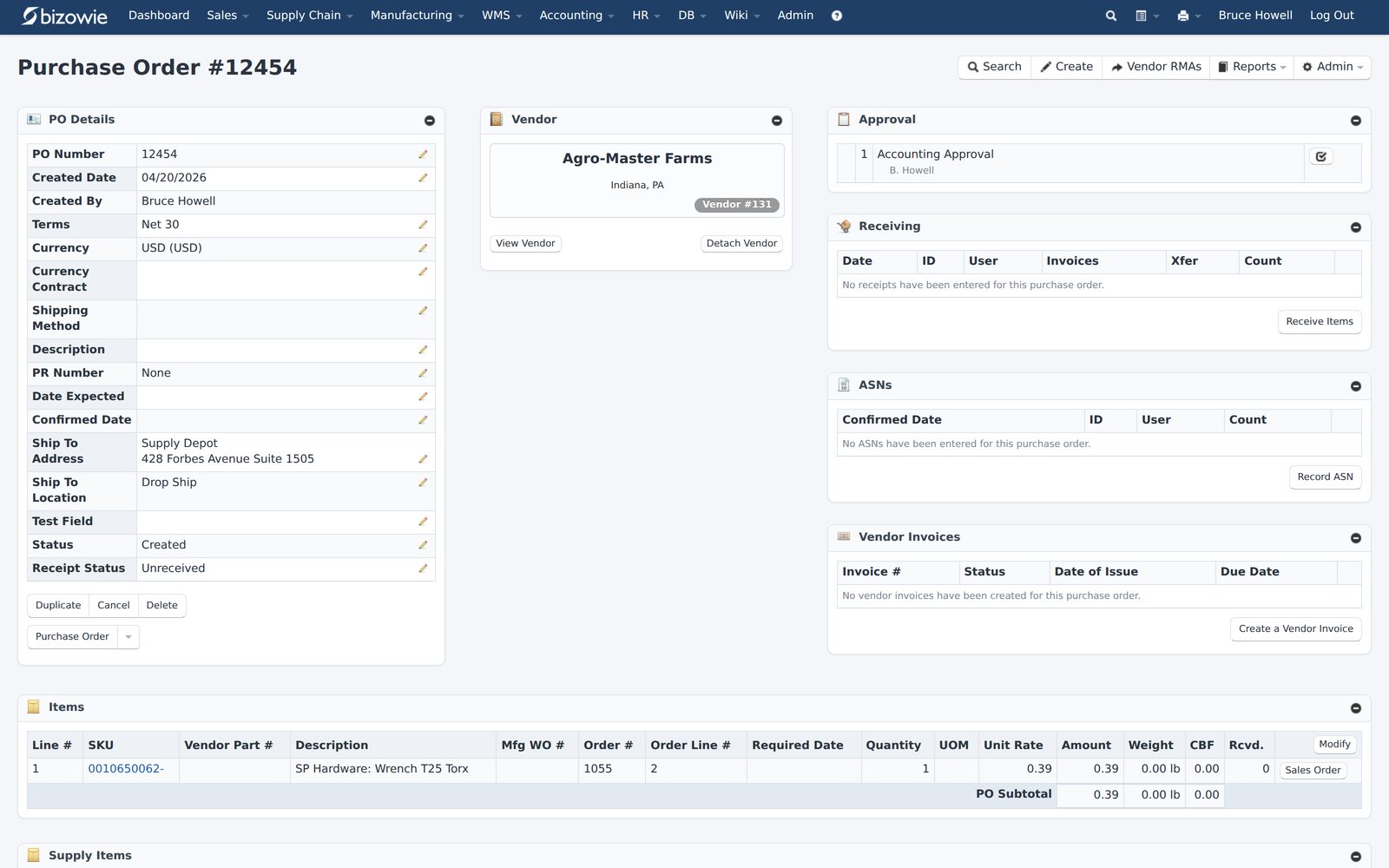
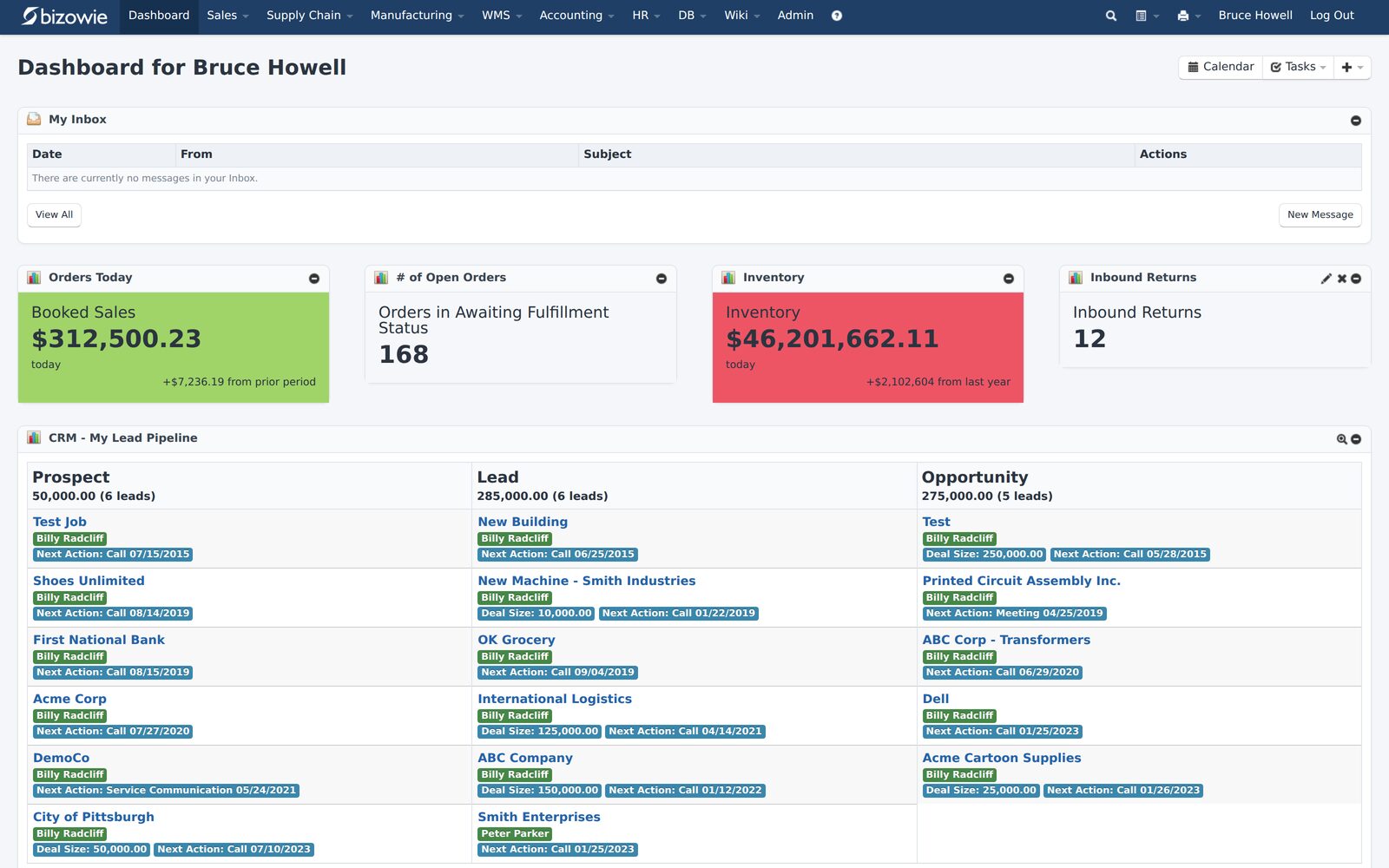
Real screens from Bizowie, not mockups. Click any screen to enlarge.
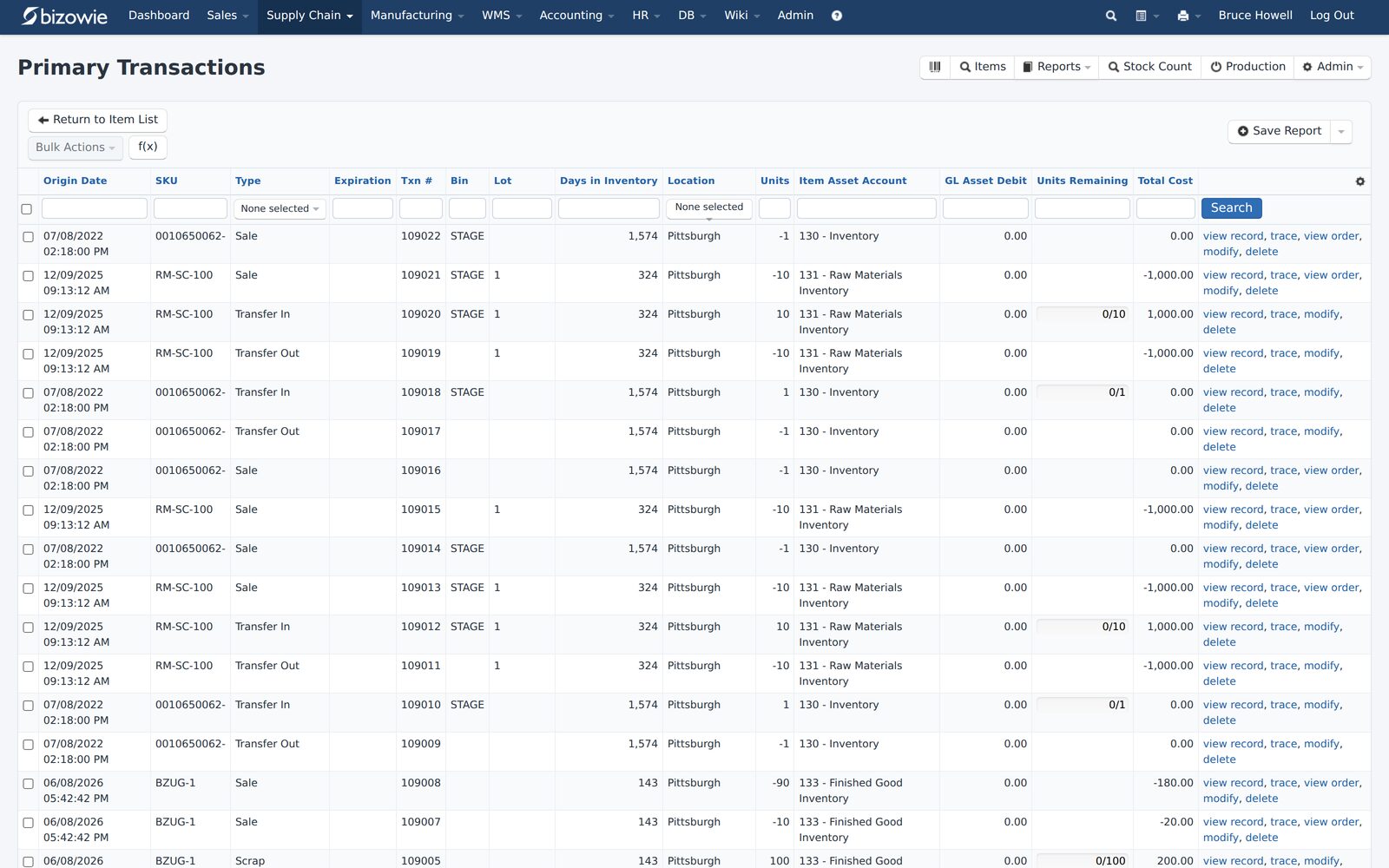
Every receipt, transfer, build, and quarantine move by SKU, lot, bin, and location.
Purchase orders with approvals, receiving, ASNs, and vendor invoices on one screen.
Bookings, open orders awaiting fulfillment, and inventory value at a glance.
Inventory and Warehouse Management in Bizowie
In Bizowie, inventory control and warehouse management are modules of the same cloud ERP platform. Order management, shipping and fulfillment, warehouse management, and financial accounting communicate with inventory control in real time, with no batch updates or import/export required, so inventory and the corresponding financial records stay up to date.
- Inventory control: multiple distribution centers, mobile warehouses, and virtual warehouses for vendor-fulfilled or drop-ship inventory, with rules to automate transfers between distribution centers. See Bizowie Inventory Control.
- Traceability: lotted and serialized items from purchase order to sale, with reports that trace a lot across transfers, production events, sales, and returns.
- Location management: nested locations down to bins, staging areas, and conveyors, with LPN tracking and barcodes at each level, and directed put-away that accounts for location-level dimensional and weight constraints.
- Mobile warehouse tasks: discrete and wave picking, packing, shipping and loading, receiving, put-away, stock counts, inventory moves, and delivery from mobile devices, with direct integrations to shipping carriers. See Bizowie Warehouse Management.
- Cross-docking: rules for how and when inventory is routed between distribution centers. See cross-docking.
- WMS Lite: for operations that don’t need the full module, barcode-based picking, packing, shipping, and receiving on touchscreen PCs, desktop computers, and tablets, with no additional hardware beyond a USB or Bluetooth barcode scanner.
“We have seen immediate economic benefit for our business in terms of productivity from our warehouse staff, eliminated processing errors, and better stock control.”
Julius Hart — Managing Director, LensesOnline
Frequently Asked Questions
What is the difference between a WMS and an inventory management system?
An inventory management system tracks how much stock you have, where, and what it is worth, and supports purchasing and replenishment. A WMS manages the physical warehouse work, such as receiving, put-away, picking, packing, shipping, and counts, usually at the bin level with barcode scanners.
What does IMS stand for?
In this context, IMS stands for inventory management system: software that tracks stock levels, locations, and value.
Is a WMS the same as inventory management?
No. A WMS includes inventory tracking inside the warehouse, but its focus is directing warehouse work. Inventory management covers stock across the whole business, including purchasing, transfers, and valuation.
Do I need both a WMS and an inventory management system?
Most growing distributors and manufacturers need both functions. They work best when they share one set of inventory records, either in one ERP or through a tight integration.
Can an ERP replace a WMS?
An ERP with built-in warehouse management can replace a standalone WMS for many distributors. Very large or highly automated distribution centers sometimes need specialized standalone functions. See WMS vs. ERP with warehouse management.
Find Out What Your Warehouse Needs
Tell us about your warehouses, order volume, and where errors happen today. We’ll walk you through how inventory and warehouse management would work in Bizowie, and if we are not the right fit, we will tell you.
Find out what your warehouse needs
For distributors and manufacturers. Tell us a little about your operation and we’ll reply with an honest assessment of fit, not a sales pitch.
- A real person reviews your submission and replies within one business day.
- No automated email sequences.
- If we’re not the right fit, we’ll tell you.
Prefer to talk?
Call (888) 635-2517, Mon–Fri, 9 AM–5 PM Eastern