
Distribution ERP Software: A Buyer’s Guide for Wholesale Distributors
Distribution looks simple from the outside.
Buy products. Keep them in stock. Sell them for more than you paid. Ship them to the customer.
The reality is considerably more complicated.
A distributor may manage thousands of SKUs across multiple warehouses, buy and sell products in different units of measure, maintain customer-specific pricing agreements, allocate limited inventory across competing orders, coordinate inbound and outbound freight, transact with major customers through EDI, manage backorders and drop shipments, and still need to know the actual margin on every order.
And all of it has to happen quickly.
That is why distribution ERP software is different from basic accounting software or a generic business management system. A good distribution ERP connects inventory, purchasing, order management, warehousing, shipping, pricing, financials, and reporting so that the entire business is working from the same information.
The important question is not whether an ERP has an “inventory module” or a “purchasing module.”
It is whether the system can handle the way your distribution business actually works.
This guide explains what that means, which capabilities matter most, where legacy systems tend to break down, and how to evaluate distribution ERP software using realistic operating scenarios rather than feature checklists.
What Is Distribution ERP Software?
Distribution ERP software is an enterprise resource planning system designed to manage the operational and financial processes involved in buying, stocking, selling, and distributing physical products.
It typically connects:
- inventory management
- purchasing and replenishment
- sales and order management
- warehouse operations
- pricing
- shipping and fulfillment
- accounts receivable and accounts payable
- general ledger and financial reporting
- EDI and e-commerce
- supplier and customer information
- reporting and analytics
The defining characteristic is not the number of modules.
It is the way those functions work together.
When a purchase order is received, inventory should update. When inventory becomes available, sales and customer service should be able to see it. When an order ships, inventory should be relieved and the appropriate financial transactions should occur. When costs change, purchasing, pricing, inventory valuation, and margin reporting should all remain consistent.
A distribution ERP should allow the business to operate as one connected system rather than a collection of departments exchanging information.
If you want to see how those capabilities come together in an actual product, see Bizowie Cloud ERP for Distributors.
Why Distribution Businesses Put So Much Pressure on ERP
Distribution is a business of inventory, velocity, and margin.
A manufacturer creates value partly by transforming raw materials into finished products. A professional services company primarily sells expertise and labor.
A distributor makes money by having the right product available at the right place, selling it at the right price, and moving it from supplier to customer efficiently.
Some distributors also kit, assemble, configure, fabricate, package, relabel, or perform light manufacturing. The boundaries between distribution and manufacturing are not always clean.
But inventory availability, fulfillment, pricing, purchasing, and margin remain at the center of the operating model.
That creates several ERP challenges.
Inventory Is Not One Number
Suppose your ERP says you have 500 units of an item.
Can you sell 500?
Maybe.
Some could already be allocated to customer orders. Some may be damaged or on quality hold. Some may be in transit between warehouses. Some may have arrived physically but not been received into the system. More inventory may be arriving tomorrow on an open purchase order.
And 200 additional units may be sitting in another warehouse.
A salesperson asking “Do we have it?” does not need an inventory balance.
They need an accurate answer to a much harder question:
What quantity can I promise this customer, from which location, and when can it ship?
A distribution ERP has to understand the difference. You can see a more detailed example of this approach in Bizowie’s cloud inventory control capabilities.
Pricing Can Be Extraordinarily Complex
The same SKU may be sold at different prices depending on:
- the customer
- customer class
- contract
- quantity
- branch
- product category
- promotion
- effective date
- cost
- margin requirement
- unit of measure
- sales channel
A spreadsheet can manage that complexity for a while.
Eventually, it becomes a liability.
A good distribution ERP should determine the correct price automatically and make exceptions visible and auditable. For a deeper look at the problem, see Managing Customer-Specific Pricing Without Losing Your Mind (or Your Margin).
Warehouse Activity Changes the Financial Picture
Receiving is not simply a warehouse transaction.
Neither is shipping.
What happens physically in the warehouse affects inventory availability, inventory valuation, purchasing, customer service, revenue, cost of goods sold, and ultimately the general ledger.
When warehouse software and ERP operate as separate worlds, businesses often spend enormous amounts of effort reconciling what happened operationally with what the financial system thinks happened.
Margins Leave Little Room for Bad Information
Distributors frequently operate in environments where small mistakes become expensive at scale.
A pricing exception that reduces margin by two percentage points may look insignificant on one order. Applied repeatedly across a large customer account, it can become material.
The same is true of excess inventory, unnecessary split shipments, missed supplier incentives, warehouse errors, expedited freight, obsolete stock, and unprofitable customers.
ERP is valuable because it gives the business a way to see and control those economics while transactions are happening—not months later when someone analyzes a spreadsheet.
What a Distribution ERP Actually Needs to Get Right
Long ERP feature lists are easy to produce.
The more useful way to evaluate distribution software is to look at the questions employees need the system to answer every day.
1. Can You Trust Your Inventory?
Everything else becomes harder when inventory is wrong.
Sales promises products that are not available. Purchasing buys items the company already owns. Warehouse employees search for stock that exists in the system but not in the bin. Customer service cannot give reliable answers. Finance writes off unexplained discrepancies.
A distribution ERP should provide visibility into inventory by product, warehouse, bin, status, lot or serial number when applicable, and other dimensions relevant to the business.
More importantly, it should distinguish between different states of inventory.
- on hand
- available
- allocated
- picked
- packed
- on hold
- in transit
- inbound on purchase orders
- backordered
- committed to another demand source
Multi-location visibility is especially important.
If Pittsburgh does not have enough inventory to fill an order but Cleveland does, what happens?
Can the system recommend shipping from another warehouse? Can it initiate a transfer? Can part of the order ship now and the remainder later? Can it account for inventory arriving tomorrow? Can the salesperson see the answer without calling the warehouse?
Those are distribution ERP questions.
2. Can Sales Accurately Promise an Order?
A customer asks:
“Can you get me 100 by Friday?”
The answer may depend on far more than whether the ERP shows 100 units on hand.
The system may need to consider:
- inventory already allocated to other customers
- warehouse location
- transfer time
- incoming purchase orders
- supplier lead time
- drop-ship options
- customer priority
- order holds
- product substitutions
- shipping cutoff times
The strongest distribution systems connect order entry with supply information so the employee taking the order can make a realistic commitment.
That matters because customers experience your ERP whether they realize it or not.
They experience it when the inventory quantity is wrong. They experience it when an order promised for Friday ships Tuesday. They experience it when customer service cannot explain what happened.
And they experience it when your operation consistently does exactly what it said it would do.
3. Can the System Apply the Right Price Without a Spreadsheet?
Complex pricing is normal in wholesale distribution.
That complexity may include contract pricing, quantity breaks, customer-specific agreements, price matrices, cost-plus calculations, promotions, rebates, special orders, and exceptions negotiated by sales.
ERP should turn those rules into repeatable logic.
A salesperson entering an order should not need to remember that Customer A has a special price on Product B through December 31, except when ordering more than 200 units, when another price tier applies.
The system should know.
Just as importantly, it should manage exceptions.
- Is the override visible?
- Does it require approval?
- Can management see how often overrides happen?
- Can the company analyze the margin impact later?
Pricing is not simply an order-entry feature. It is a margin-control system.
4. Can Purchasing Tell What Actually Needs to Be Bought?
A purchasing system that only says “inventory is below the reorder point” is not enough for many distributors.
Buyers may need to consider:
- current stock
- committed demand
- open customer orders
- expected receipts
- supplier lead times
- order multiples
- minimum purchases
- seasonality
- safety stock
- warehouse-specific demand
- transfers
- drop shipments
- vendor availability
- changing costs
The objective is not to maximize inventory.
It is not to minimize inventory either.
The objective is to carry enough of the right inventory to support the desired service level without tying up unnecessary working capital.
ERP should give buyers better information for making that tradeoff.
5. Can Your Warehouse Execute Without Tribal Knowledge?
The warehouse is where ERP data becomes physical activity.
Products arrive. Employees receive them, inspect them, label them, put them away, replenish forward picking locations, pick orders, pack cartons, load trucks, process transfers, count inventory, and handle returns.
If the ERP does not support those processes well, employees create workarounds.
Those workarounds may involve paper pick tickets, handwritten notes, spreadsheets, radio calls, memory, or instructions that only a handful of experienced employees understand.
That makes growth difficult. It also makes training difficult.
A capable warehouse management system should help direct the work.
Depending on the operation, that can include:
- barcode-driven receiving
- directed putaway
- bin-level inventory
- replenishment
- wave, batch, zone, or discrete picking
- packing verification
- lot and serial capture
- cycle counting
- cross-docking
- transfer processing
- shipping validation
- mobile warehouse workflows
The goal is not simply to automate the warehouse.
It is to make the correct process easier to execute consistently.
6. Can Orders Move Without People Rekeying Them?
Many distribution companies do not receive orders through a single channel.
Orders may arrive through:
- inside sales
- field sales
- EDI
- B2B e-commerce
- consumer e-commerce
- marketplaces
- customer portals
- recurring order programs
The more order volume a company processes, the more expensive manual entry becomes.
And labor is only part of the problem.
Every manual transcription creates another opportunity for the wrong product, quantity, ship-to address, price, unit of measure, or requested date to enter the system.
A modern distribution ERP should be capable of accepting transactions electronically where it makes sense and moving them into the same fulfillment process used by manually entered orders.
That includes electronic data interchange (EDI).
For distributors serving larger retailers, manufacturers, healthcare organizations, government entities, or other sophisticated customers, EDI may not be an optional convenience. It may be part of the cost of doing business.
For customers that prefer self-service ordering, a tightly integrated B2B customer portal can solve a similar problem without creating another disconnected order channel.
7. Can You See the Real Margin?
Revenue is obvious.
Profitability can be considerably harder.
Imagine two customers purchase the same product for the same price.
One submits clean electronic orders, buys full cases, receives standard shipments, and pays on time.
The other sends manual orders, requires special labeling, buys broken quantities, generates multiple partial shipments, requires expensive freight, frequently returns merchandise, and pays slowly.
Are those customers equally profitable?
Probably not.
A distribution ERP should help management understand profitability across dimensions such as:
- customer
- order
- product
- product line
- sales representative
- warehouse
- branch
- supplier
- channel
Depending on the business, meaningful margin analysis may also need to account for landed costs, freight, commissions, rebates, discounts, and other expenses.
That gives management something far more useful than a revenue ranking.
It helps answer:
Where are we actually making money?
8. Do Operations and Finance Agree on What Happened?
One of ERP’s most important jobs is connecting operational events with financial consequences.
When goods are received, inventory and purchasing records should reflect the receipt.
When products ship, inventory should be relieved appropriately.
When an invoice is created, accounts receivable and revenue should update.
When costs change, inventory valuation and cost of goods sold need consistent logic.
When employees make adjustments, there should be an audit trail.
A company should not need separate interpretations of the business depending on whether someone asks operations or accounting.
That is one of the reasons an integrated core ERP platform matters.
See Bizowie in Action
Real screens from Bizowie, not mockups. Click any screen to enlarge.
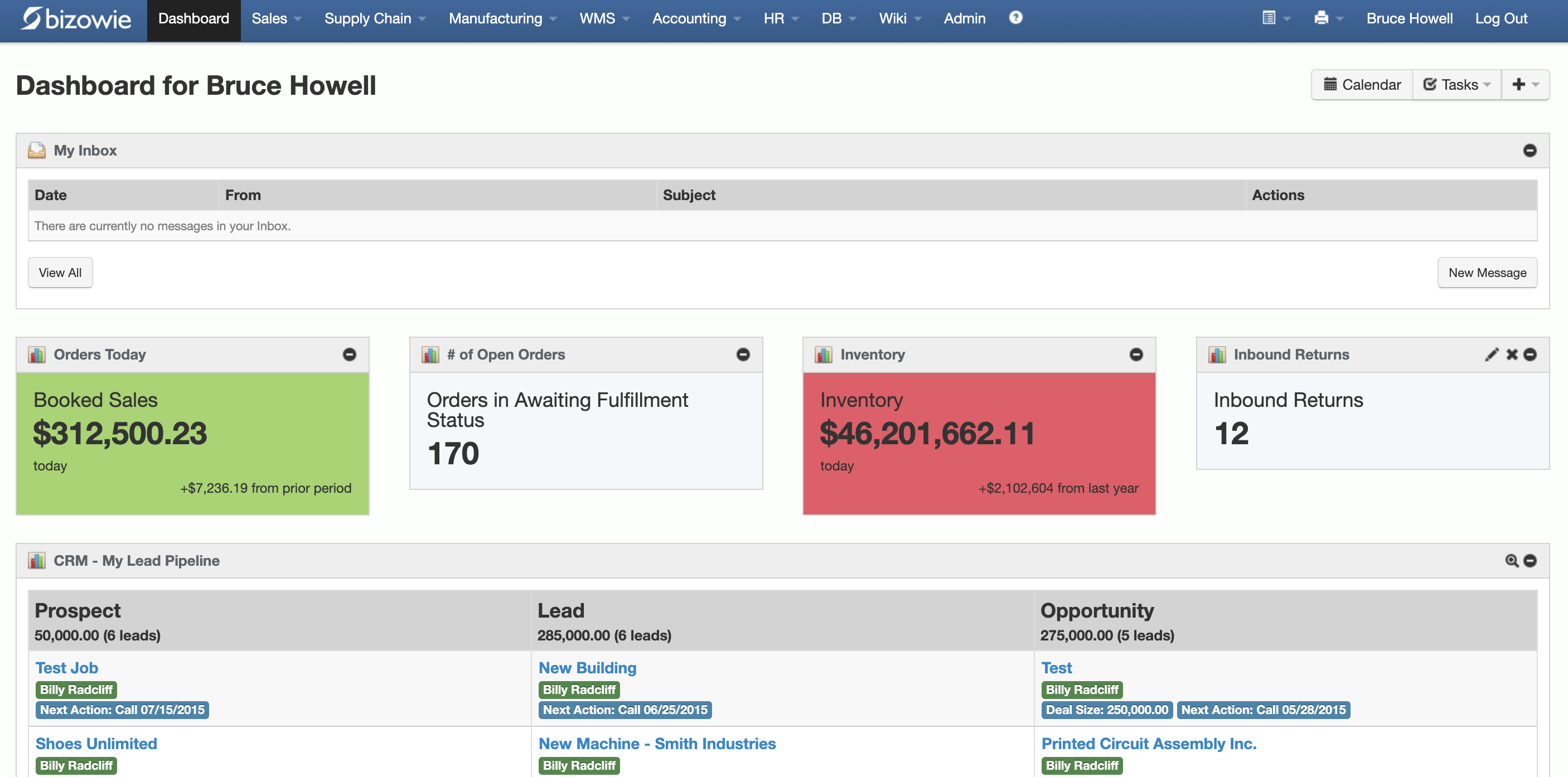
Live Dashboard
Bookings, open orders awaiting fulfillment, and inventory value at a glance.
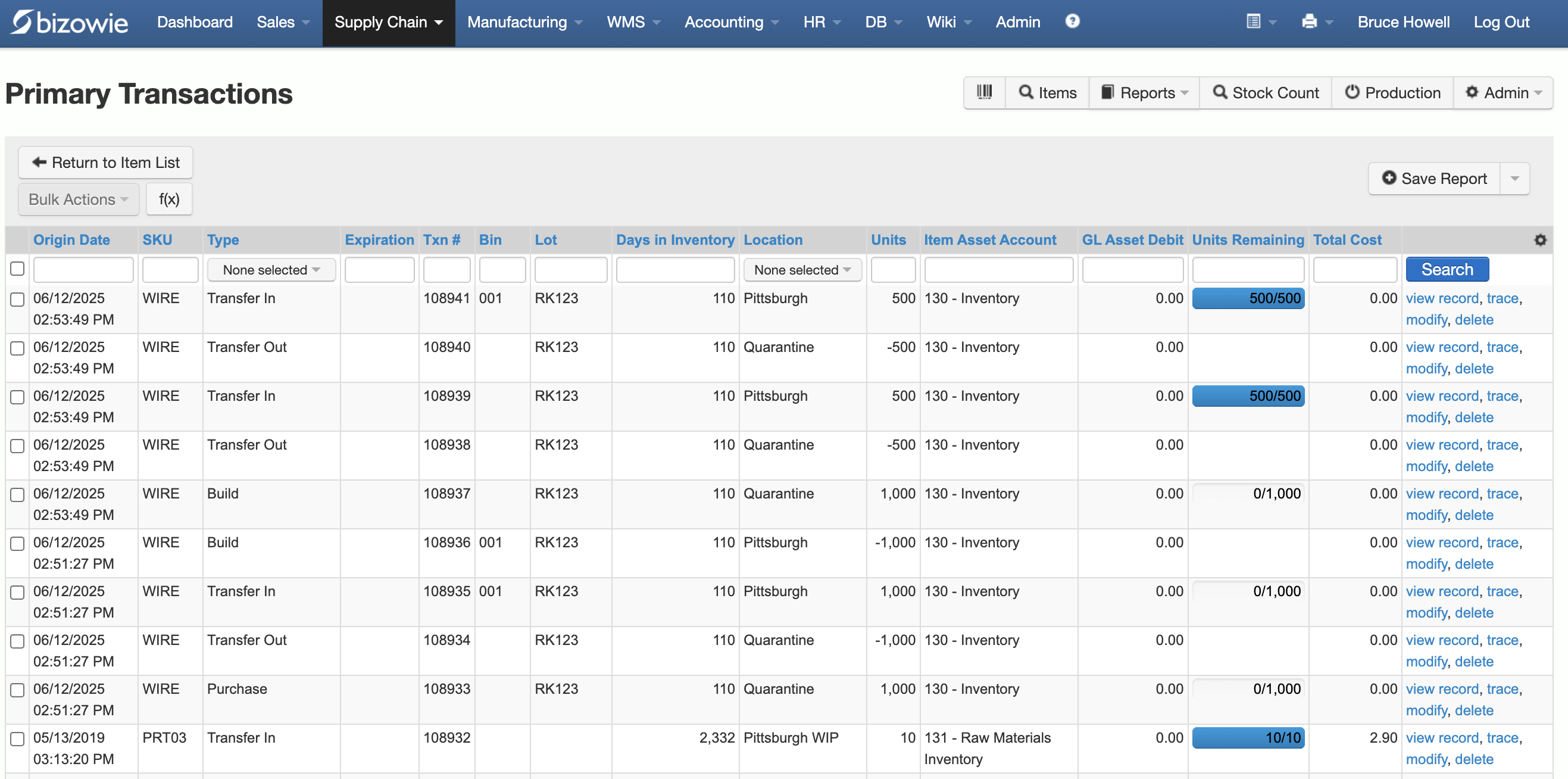
Inventory Transactions
Every receipt, transfer, build, and quarantine move by SKU, lot, bin, and location.
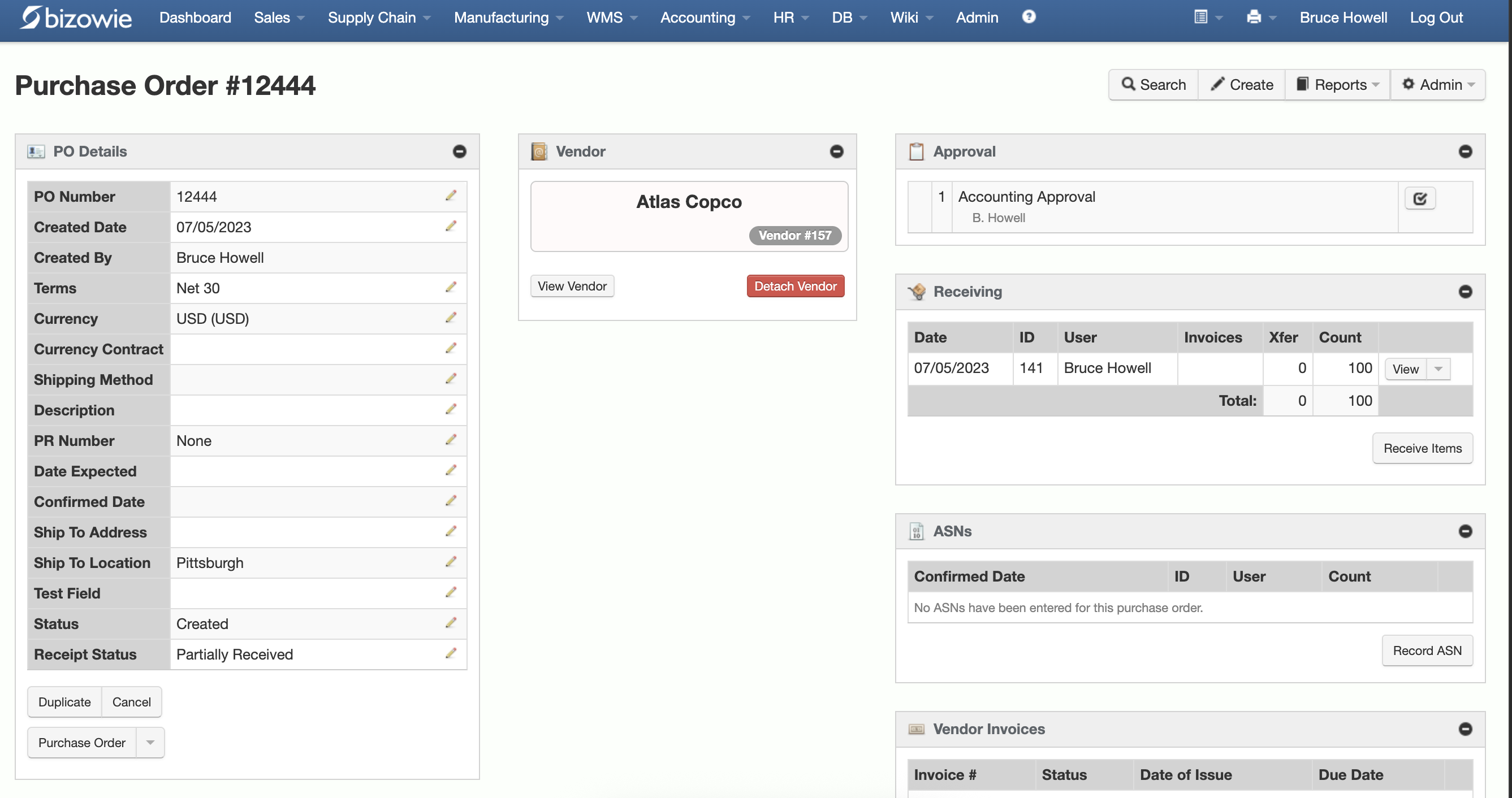
Purchasing & Receiving
Purchase orders with approvals, receiving, ASNs, and vendor invoices on one screen.
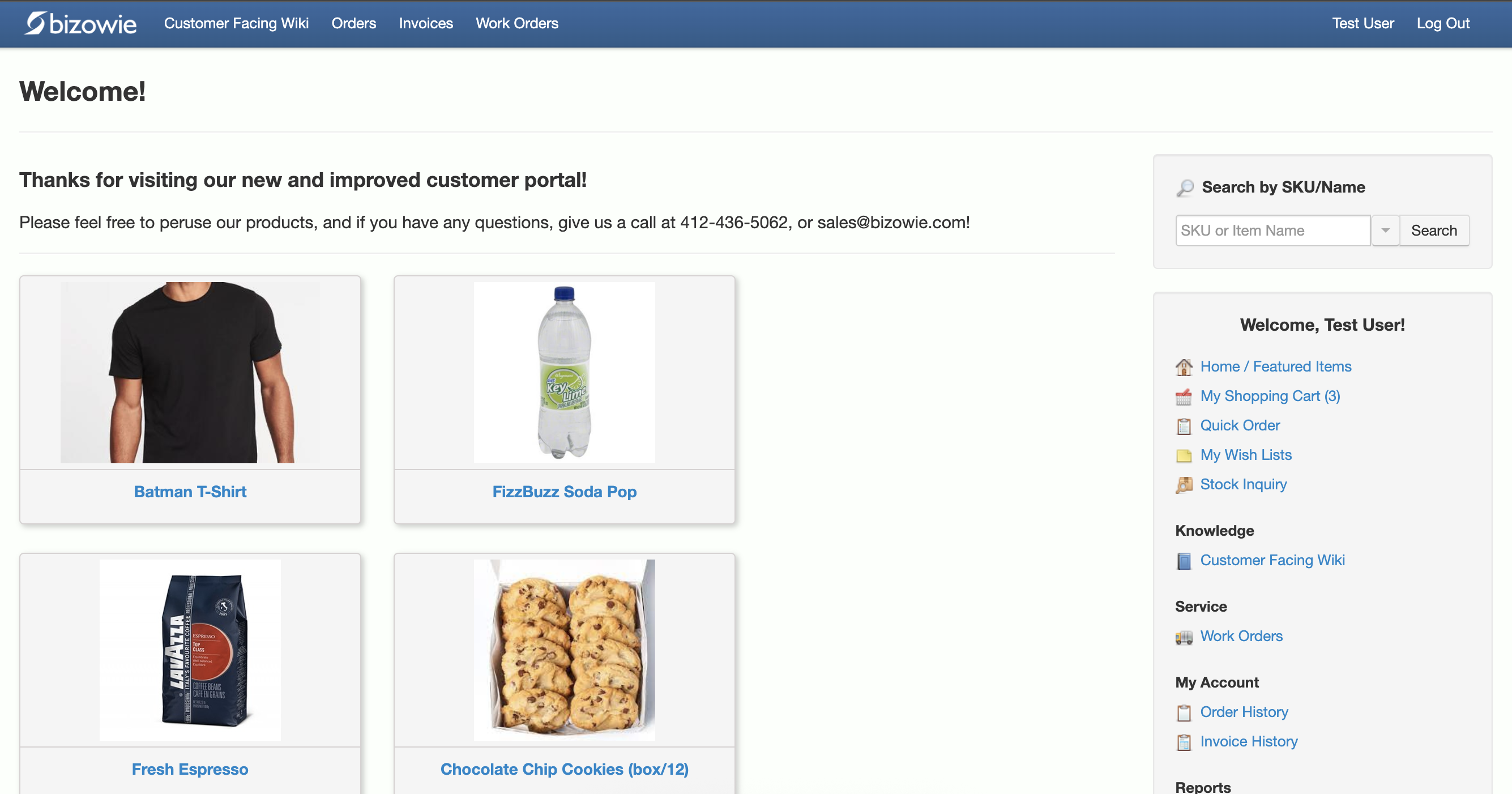
B2B Customer Portal
Customers search items, place orders, and check order and invoice history themselves.
How an Order Should Flow Through a Distribution ERP
One of the best ways to understand ERP is to stop thinking about modules and follow a transaction.
Consider a customer ordering 100 units.
- The ERP determines the customer’s applicable price and payment terms.
- It evaluates inventory availability.
- It determines whether the order can be fulfilled from one location or whether another supply strategy is necessary.
- Inventory is allocated.
- The warehouse receives the work.
- A picker is directed to the appropriate product and location.
- The product is scanned.
- Packing verifies the shipment.
- Carrier information and tracking are captured.
- Inventory is relieved.
- The shipment is confirmed.
- The customer is invoiced.
- Accounts receivable is updated.
- Revenue and cost are reflected in the financial system.
- The order becomes part of sales, margin, inventory, warehouse, and customer-service reporting.
That is what integrated ERP means in practice.
The company should not have to recreate the transaction in five applications and hope all five eventually agree.
ERP and WMS: Separate Systems or One Platform?
Distributors evaluating ERP often have to decide whether warehouse management should live inside the ERP or in a separate WMS.
There is no universal answer.
A highly specialized or heavily automated distribution center may have requirements that justify a dedicated best-of-breed WMS.
But separating ERP and WMS introduces an important question:
Where does operational truth live?
Consider an order being picked.
The ERP may own the sales order and allocation. The WMS owns the physical pick. The shipping system may own the shipment. The ERP needs the result so it can relieve inventory and invoice the customer.
If those applications are separate, integrations must keep the transaction synchronized across all of them.
That can work well.
But it adds interfaces that need to be built, monitored, supported, and updated.
For many mid-market distributors, an integrated ERP and WMS can remove that complexity by allowing warehouse transactions to operate directly against the same inventory, order, purchasing, and financial data used by the rest of the business.
The right approach depends on the sophistication of the warehouse.
What matters is understanding the tradeoff rather than assuming more applications automatically means more capability.
Distribution ERP vs. Accounting Software
Growing distributors often reach a point where accounting software still handles the books adequately but the operation around it has become increasingly difficult to manage.
The warning signs tend to appear outside accounting first.
- Inventory lives partly in spreadsheets.
- Pricing rules live in someone’s head.
- Warehouse employees use separate systems.
- Salespeople call purchasing to ask when products will arrive.
- Customer service calls the warehouse to determine whether an order shipped.
- EDI runs through a disconnected service.
- Reporting requires exports from several applications.
- Accounting spends days reconciling systems that should agree automatically.
At that point, the limitation is not necessarily the accounting software.
It is the absence of a system designed to run the entire operation.
Accounting software records financial activity. ERP connects the operational activity that creates those financial results.
Signs You May Have Outgrown Your Current ERP
ERP systems rarely fail dramatically.
Companies outgrow them gradually.
People build workarounds around one limitation, then another, then another.
Eventually, the workarounds become the operating system.
Common warning signs include:
- Employees maintain critical spreadsheets because they do not trust the ERP.
- Inventory accuracy is a recurring problem.
- Sales cannot confidently see what is available.
- Pricing requires manual lookup or frequent overrides.
- Purchasing depends heavily on individual buyer knowledge.
- Warehouse processes rely on paper or memory.
- Multiple applications contain overlapping versions of the same data.
- EDI and e-commerce orders require manual intervention.
- Reporting requires exporting and combining data.
- New warehouses or business entities are difficult to add.
- Integrations are fragile or expensive to maintain.
- Employees avoid upgrades because customizations may break.
- Financial close requires extensive reconciliation.
- Management struggles to analyze profitability below the company level.
- Customer service spends too much time researching basic order questions.
No single item means you need a new ERP.
But when several are persistent, the issue may no longer be user training or process discipline.
The underlying system may simply no longer fit the business.
If that system is QuickBooks, see our guide to outgrowing QuickBooks.
Modern Distribution ERP vs. Legacy Distribution ERP
An older ERP can contain a large number of features and still make the business difficult to operate.
The difference between modern and legacy ERP is therefore not simply the feature list.
It is how the system behaves over time.
Real-Time Processing vs. Delayed Synchronization
Ask what happens immediately after a transaction.
When inventory is received, when does sales see it?
When an order ships, when does customer service know?
When pricing changes, when does the new rule take effect?
Systems that rely heavily on batch jobs, periodic synchronization, or manual updates create windows where different departments are working from different information.
APIs vs. File-Based Integration
Modern businesses constantly add and change external systems.
The ERP may need to communicate with e-commerce platforms, EDI providers, carriers, payment processors, 3PLs, tax applications, banks, CRM systems, and business intelligence tools.
Modern APIs make those connections easier to build and maintain than architectures that depend primarily on scheduled file exports and imports.
File-based integration is not inherently wrong. EDI itself frequently involves structured messages and managed exchanges.
The question is whether the ERP gives the business practical, maintainable ways to connect with the outside world.
Configuration vs. Modifying Core Code
Distributors often have unique requirements.
That does not necessarily mean every requirement should result in custom source code.
Modern ERP platforms increasingly allow organizations to configure workflows, approvals, fields, screens, reports, dashboards, business rules, and integrations without modifying the core product.
That distinction matters later.
The more heavily an ERP’s core software has been modified, the harder upgrades can become.
Continuous Improvement vs. Periodic Upgrade Projects
Ask every ERP vendor a simple question:
What does an upgrade look like for a customer that has been using your software for five years?
Does the customer simply receive new functionality?
Or does the business need to scope a project, hire consultants, test customizations, migrate environments, and schedule downtime?
The answer tells you a great deal about the platform.
If you want a deeper explanation of the architectural differences, read What Is Cloud ERP? and Bizowie’s overview of its cloud ERP infrastructure.
How to Evaluate Distribution ERP Software
The typical ERP evaluation begins with a spreadsheet containing hundreds of requirements.
That can be useful.
It can also create false confidence.
Two vendors may both put a checkmark next to “multi-location inventory” while handling a real multi-location scenario completely differently.
The better approach is to combine requirements with scenario-based demonstrations.
Give vendors situations that are difficult in your business today and make them show exactly how the software handles them.
Scenario 1: Multi-Location Inventory
We receive an order for 100 units. Forty are available in Warehouse A. Fifty are available in Warehouse B. Another 100 are expected from the supplier tomorrow. Show us what the salesperson sees and how the system recommends fulfilling the order.
Watch what happens.
Does the system understand available inventory rather than simply on-hand inventory?
Can it split fulfillment?
Can it recommend a transfer?
Does it account for inbound supply?
Can the salesperson make an accurate promise without leaving order entry?
Scenario 2: Customer-Specific Pricing
Show us two customers buying the same SKU in the same quantity with different contract pricing. Now override one price below our margin threshold. Show us what happens.
You are testing more than pricing.
- rule precedence
- effective dates
- margin visibility
- authorization
- approval workflow
- auditability
Scenario 3: Partial Receipt
We ordered 1,000 units. The supplier delivers 800, 20 are damaged, and the invoice is for the full 1,000. Show us receiving, inventory, purchasing, and accounts payable.
This tests whether modules actually work together.
Scenario 4: Backordered Customer Demand
A high-priority customer has 50 units on backorder. New inventory arrives, but several other customers also have open demand. Show us how allocation works.
Look for the ability to understand priority rather than simply first-in, first-out processing.
Scenario 5: Warehouse Exception
The picker goes to the suggested bin and the product is not there. Show us what happens next.
Real warehouse operations are full of exceptions.
A polished happy-path demonstration tells you very little about how the system behaves when reality does not match the plan.
Scenario 6: Profitability
Show us the actual profitability of this order after product cost, freight, commission, discount, and any other relevant costs. Then show profitability for the customer across the last twelve months.
If profitability matters to the buying decision, make the vendor prove it.
Scenario 7: EDI or E-Commerce
Ask the vendor to trace an electronic order from beginning to end.
- Where does it enter?
- What validation occurs?
- What happens when something is wrong?
- How does it reach fulfillment?
- How does the customer receive confirmation, shipment information, and the invoice?
And most importantly:
Where does a person have to intervene?
Questions to Ask Every Distribution ERP Vendor
Beyond demonstrations, buyers should understand the technology and business model behind the product.
Was the Product Originally Designed for Distribution?
You are not looking for a particular marketing answer.
You are trying to understand whether distribution workflows are native or heavily adapted.
How Are Updates Delivered?
Find out whether updates require customer projects, consulting, downtime, or regression testing.
How Does the System Handle Custom Requirements?
Ask what can be configured, what requires custom development, and what happens to those changes during updates.
How Does WMS Interact With ERP?
If WMS is separate, understand the integration and which system owns inventory at each point in the process.
How Open Is the System?
Ask to see API documentation.
Determine which external systems have standard integrations and what is required to build something new.
How Is Customer Data Protected and Isolated?
Do not accept “we’re in the cloud” as a security explanation.
Ask about authentication, authorization, encryption, backups, disaster recovery, monitoring, and data architecture.
Who Implements the Software?
Determine who is responsible for discovery, configuration, data migration, integrations, testing, training, and go-live support.
Who Owns the Problem When Something Crosses Boundaries?
ERP issues rarely respect organizational charts.
If an order fails between ERP, EDI, warehouse operations, and shipping, you need to know who takes responsibility for resolving it.
What Will This Cost Us Over Five Years?
Include:
- software
- implementation
- integrations
- data migration
- training
- support
- infrastructure
- upgrade costs
- required third-party products
- customization
- internal resources
The lowest subscription price is not necessarily the lowest-cost ERP.
For more detail on the economics, see Cloud ERP Pricing: What It Actually Costs.
Comparing Bizowie with a specific vendor? See our side-by-side comparisons with NetSuite, Acumatica, and Prophet 21.
How to Think About Distribution ERP ROI
ERP business cases often become unreliable when they are built from generic promises such as “20% productivity improvement” or “25% inventory reduction.”
Your business case should start with your numbers instead.
Identify problems you can actually measure.
Inventory
How much inventory are you carrying?
How much is slow-moving or obsolete?
How often do you carry excess safety stock because you do not trust availability or replenishment data?
Suppose you carry $5 million of inventory.
If better planning and visibility allowed you to remove 5% of unnecessary inventory without harming service levels, that would release $250,000 of working capital.
That is not a promise that ERP will reduce inventory by 5%.
It is a scenario you can evaluate against your own operation.
Warehouse Labor
How much warehouse time is spent:
- searching for products
- walking inefficient pick paths
- correcting picking errors
- entering transactions manually
- investigating discrepancies
- conducting physical counts
- reprinting or correcting shipments
Estimate the cost of those activities today.
Then evaluate whether the proposed system materially changes them.
Order Entry
How many orders are entered manually?
How many lines per order?
How much time does each take?
How much exception handling results from entry errors?
An EDI or e-commerce integration has a very different business case for a company entering 50 orders per day than one entering 2,000.
Shipping Errors
Measure:
- mis-picks
- short shipments
- incorrect products
- address corrections
- reshipments
- credits
- expedited replacement freight
Those are real costs.
Pricing and Margin
How often are prices manually overridden?
How quickly can management identify margin erosion?
Are freight and other costs reflected when evaluating customer profitability?
Does the business know which customers or product lines generate revenue without generating adequate profit?
Administrative Work
How many hours are spent:
- reconciling applications
- producing reports manually
- importing and exporting data
- correcting integration failures
- closing the books
- answering questions that should be visible in the ERP
Those costs belong in the ERP business case too.
The objective is not to manufacture a return large enough to justify a project.
It is to understand whether the problems you are trying to solve are economically significant enough to justify changing systems.
“What used to take us 30 to 45 minutes can now be done in 3 to 5 minutes.”
Bridget Gaussa — Director of Program Development, Cribs for Kids
Distribution ERP Implementation: What Actually Determines Difficulty
Cloud software can remove infrastructure work from an ERP implementation.
It does not remove implementation work.
The biggest drivers of difficulty are usually business complexity, data quality, integrations, decision-making, and organizational readiness.
For a deeper treatment of the subject, see our Cloud ERP Implementation Guide and ERP Implementation Checklist.
Data
ERP migration often exposes years of accumulated data problems.
- Duplicate customers.
- Inactive items.
- Incorrect units of measure.
- Old pricing records.
- Inconsistent supplier information.
- Invalid addresses.
- Inventory balances nobody trusts.
Moving bad data into a new ERP faster does not improve it.
Decide what needs to be cleaned, migrated, archived, or left behind.
Processes
Replacing ERP is an opportunity to question how work is performed.
Some existing processes exist because they are genuinely required by the business.
Others exist because the old system could not do something properly.
Distinguishing between the two is important.
Otherwise, a company can spend significant money configuring a modern ERP to reproduce limitations inherited from the old one.
Integrations
Inventory every external system that exchanges information with the ERP.
Do not stop at the obvious ones.
Look for spreadsheets, scheduled exports, scripts, shared drives, EDI mappings, label programs, carrier software, customer portals, bank files, tax applications, e-commerce systems, 3PL feeds, and other processes that may have become invisible because they have existed for years.
People
ERP implementations require decisions.
- Which pricing rule wins when two rules apply?
- When should inventory be allocated?
- Who can override credit holds?
- How should transfers be prioritized?
- What constitutes an acceptable substitute?
- Who owns customer master data?
Software cannot answer those questions for you.
Strong implementations have clear business owners empowered to make decisions.
Who Should Be Involved in the ERP Selection?
Distribution ERP touches too much of the business to be chosen by one department.
A serious evaluation should normally involve representatives from:
- operations
- warehouse management
- purchasing
- customer service
- sales
- finance
- IT
- executive leadership
Each sees a different part of the problem.
Warehouse employees know where inventory transactions break down.
Customer service knows which questions are hardest to answer.
Purchasing knows which supplier and replenishment issues create unnecessary work.
Finance knows where reconciliation and reporting fail.
IT knows which integrations, security requirements, and technical dependencies matter.
Leadership has to decide which problems are worth solving and which compromises are acceptable.
A system that looks excellent to one department can still fail the business.
What “Purpose-Built for Distribution” Should Actually Mean
Vendors frequently describe ERP as “purpose-built.”
The phrase is only meaningful if it changes how the software handles real transactions.
A distribution ERP does not need every possible feature used by every possible distributor.
It needs the right underlying model for distribution.
That means understanding concepts such as:
- inventory availability
- allocation
- multi-location fulfillment
- replenishment
- complex pricing
- purchasing
- warehouse execution
- lot and serial traceability
- landed cost
- backorders
- customer-specific requirements
- electronic transactions
- profitability
Then it needs enough flexibility to accommodate the differences between distributors.
A food distributor does not operate exactly like an electrical distributor.
An industrial parts distributor does not operate exactly like an apparel wholesaler.
A distributor shipping pallets to retailers does not have the same warehouse workflow as one processing thousands of small-parcel orders.
The goal is therefore not rigid “industry software.”
It is a platform whose assumptions match distribution and whose configuration can match your operation.
What Makes a Good Distribution ERP?
A good distribution ERP makes the company easier to operate.
That sounds obvious, but it is a better standard than comparing feature counts.
Employees should spend less time searching for information.
Sales should have greater confidence in what can be promised.
Purchasing should have better information about what needs to be replenished.
Warehouse employees should know what to do next.
Customer service should be able to answer questions without launching an investigation.
Finance should trust the operational transactions flowing into the books.
Managers should be able to understand performance without assembling spreadsheets from multiple systems.
And the company should be able to change—adding products, warehouses, channels, customers, integrations, or business units—without every change becoming an IT project.
That is what an ERP should accomplish.
Frequently Asked Questions About Distribution ERP
What Is the Difference Between Distribution ERP and Regular ERP?
Distribution ERP emphasizes the processes that are most important to companies that buy, stock, and resell products: inventory availability, purchasing, replenishment, warehousing, pricing, order fulfillment, shipping, EDI, and margin management.
A general ERP may support many of those functions as well. The difference is the depth of the workflows and how naturally they fit distribution operations.
Do Distributors Need a WMS in Addition to ERP?
It depends on the warehouse.
Smaller or simpler operations may be adequately served by ERP inventory and fulfillment capabilities.
More complex warehouses may need dedicated WMS functionality for barcode-directed workflows, bin management, replenishment, wave or zone picking, cross-docking, and other advanced processes.
That WMS may be integrated into the ERP platform or provided as a separate application.
The important question is whether warehouse transactions remain synchronized with inventory, orders, purchasing, shipping, and financials.
When Should a Distributor Replace Its ERP?
There is no single trigger.
Replacement becomes worth evaluating when system limitations are creating persistent operational costs: unreliable inventory, excessive spreadsheets, manual re-entry, fragile integrations, inability to support growth, difficult upgrades, poor warehouse execution, weak reporting, or extensive reconciliation.
If employees spend significant time compensating for the ERP, those workarounds should be included in the cost of keeping it.
Is Cloud ERP Better for Distributors?
Cloud ERP can reduce infrastructure responsibility, simplify software delivery, support distributed locations, and make scaling easier.
But “cloud” alone does not make an ERP good.
Distributors should still evaluate functionality, architecture, integration, security, performance, update practices, vendor support, implementation approach, and total cost.
How Much Does Distribution ERP Cost?
There is no useful universal price.
Cost varies based on users, functionality, transaction volume, implementation complexity, integrations, data migration, support, and vendor pricing model.
Instead of comparing license or subscription prices alone, estimate total cost over the expected life of the system.
How Long Does Distribution ERP Implementation Take?
Implementation length depends heavily on the operation.
A single-location distributor with clean data and few integrations is very different from a multi-entity business with several warehouses, extensive EDI, custom pricing, e-commerce, multiple currencies, and years of legacy data.
Ask vendors for examples involving customers with comparable complexity rather than relying on a generic implementation timeline.
What Should We Show an ERP Vendor During Evaluation?
Show them the difficult cases.
Bring your complicated pricing agreement.
Your ugliest customer order.
Your strangest unit-of-measure conversion.
Your partial shipment.
Your backorder.
Your multi-warehouse fulfillment problem.
Your EDI exception.
Your awkward return.
Your most complicated month-end reconciliation.
A vendor who can only demonstrate clean transactions using its own sample data has not demonstrated that the ERP can run your business.
Distribution ERP Built Around the Way Distributors Operate
Bizowie Cloud ERP is built for mid-market distributors and manufacturers that have outgrown disconnected systems, manual workarounds, and legacy ERP software.
For distributors, the platform connects real-time inventory, purchasing, order management, financials, warehouse operations, pricing, reporting, EDI, shipping, and customer-facing tools in one environment.
That matters because distribution problems rarely stay inside one department.
An inventory problem becomes a customer-service problem.
A purchasing problem becomes a stockout.
A pricing problem becomes a margin problem.
A warehouse problem becomes a shipping problem.
And disconnected software turns all of them into reconciliation problems.
The objective of an integrated distribution ERP is to keep those processes working from the same underlying transactions so that the business does not have to spend its time making systems agree.
“We have seen immediate economic benefit for our business in terms of productivity from our warehouse staff, eliminated processing errors, and better stock control.”
Julius Hart — Managing Director, LensesOnline
Put Your Hardest Workflow in Front of Us
If you are evaluating ERP, do not start by asking for a generic product tour.
Bring us something that is difficult in your business today.
- A complicated pricing rule.
- A multi-location order.
- A warehouse workflow.
- A replenishment problem.
- An EDI requirement.
- A unit-of-measure mess.
- A reporting question your current system cannot answer.
We’ll show you how Bizowie would handle it—and if the platform is not a good fit for your operation, we’ll tell you that too.
See if Bizowie is right for your distribution business
Tell us a little about your operation and we’ll reply with an honest assessment of fit, not a sales pitch.
- A real person reviews your submission and replies within one business day.
- No automated email sequences.
- If we’re not the right fit, we’ll tell you.
Prefer to talk?
Call (888) 635-2517, Mon–Fri, 9 AM–5 PM Eastern