
ERP vs. CRM: What’s the Difference, and Do You Need Both?
ERP and CRM are both “systems of record,” which is why they get confused.
The difference is what each one records. A CRM records your relationships with customers and prospects: who they are, what you have discussed, and what you might sell them. An ERP records what actually happens in the business: orders, inventory, shipments, production, invoices, and the general ledger.
Most growing manufacturers and distributors need both sets of capabilities. The real question is whether they should live in one system or two.
ERP vs. CRM: The Short Answer
- CRM (customer relationship management) manages the front end of the customer relationship: leads, opportunities, contacts, sales activity, and pipeline forecasting.
- ERP (enterprise resource planning) manages the operation: orders, pricing, inventory, purchasing, warehousing, shipping, manufacturing, and accounting.
A CRM tells you what a customer might buy. An ERP tells you what they did buy, whether you can deliver it, and whether you made money on it.
ERP vs. CRM Side by Side
| CRM | ERP | |
|---|---|---|
| Main purpose | Win and grow customer relationships | Run and account for the business |
| Primary users | Sales, marketing, account managers | Operations, warehouse, purchasing, production, finance, customer service |
| Core records | Leads, contacts, opportunities, activities | Orders, items, inventory, purchase orders, work orders, invoices, ledger |
| Key question it answers | Who should we sell to, and what is in the pipeline? | What did we sell, can we fulfill it, and what did it cost? |
| Time focus | Future: potential revenue | Present and past: actual transactions |
What a CRM Does
- Tracks leads from first contact to qualified opportunity
- Manages contacts and accounts, including parent and child accounts
- Records calls, emails, meetings, and notes
- Manages the sales pipeline and forecasts
- Produces quotes and proposals
- Supports marketing lists and campaigns
What an ERP Does
- Converts quotes into sales orders with the right pricing
- Allocates inventory and manages backorders
- Purchases and receives stock, or plans and runs production
- Picks, packs, and ships orders
- Invoices customers, collects payments, and posts to the general ledger
- Reports margin by customer, product, and rep
For a full breakdown, see our guide to ERP modules.
Where They Overlap
The two meet in the places sales reps and customer service work every day:
- Quotes: a quote built in the CRM needs current pricing, costs, and availability from the ERP.
- Customer records: addresses, terms, credit limits, and contacts are needed by both.
- Order history: reps need to see what a customer has bought, what is open, and what has shipped.
- Pricing: customer-specific prices and contracts usually live in the ERP, but reps quote from them.
The Problems With Separate Systems
When CRM and ERP are separate, those overlap points become integration points, and integrations drift:
- Reps quote prices that do not match what the ERP will charge.
- Reps promise stock that has already been allocated.
- Customer records diverge, so one system has the old address or the wrong terms.
- Reps cannot see order status or invoices, so they call customer service, who looks it up in the ERP.
- Margin by rep and customer has to be assembled from two systems.
See the integration tax of best-of-breed systems.
One System or Two?
A Separate CRM Can Make Sense When
- Your sales process is long, marketing-heavy, and largely separate from fulfillment
- You have a large sales team already invested in a dedicated CRM
- You need advanced marketing automation that the ERP does not provide
CRM Inside the ERP Makes Sense When
- Reps need real-time pricing, inventory, and order history to sell
- Most selling happens with existing customers who reorder
- Customer service and sales handle the same accounts
- You want margin by rep and customer without a separate report-building project
For most mid-market distributors and manufacturers, the second list describes the day-to-day reality.
See Bizowie in Action
Real screens from Bizowie, not mockups. Click any screen to enlarge.
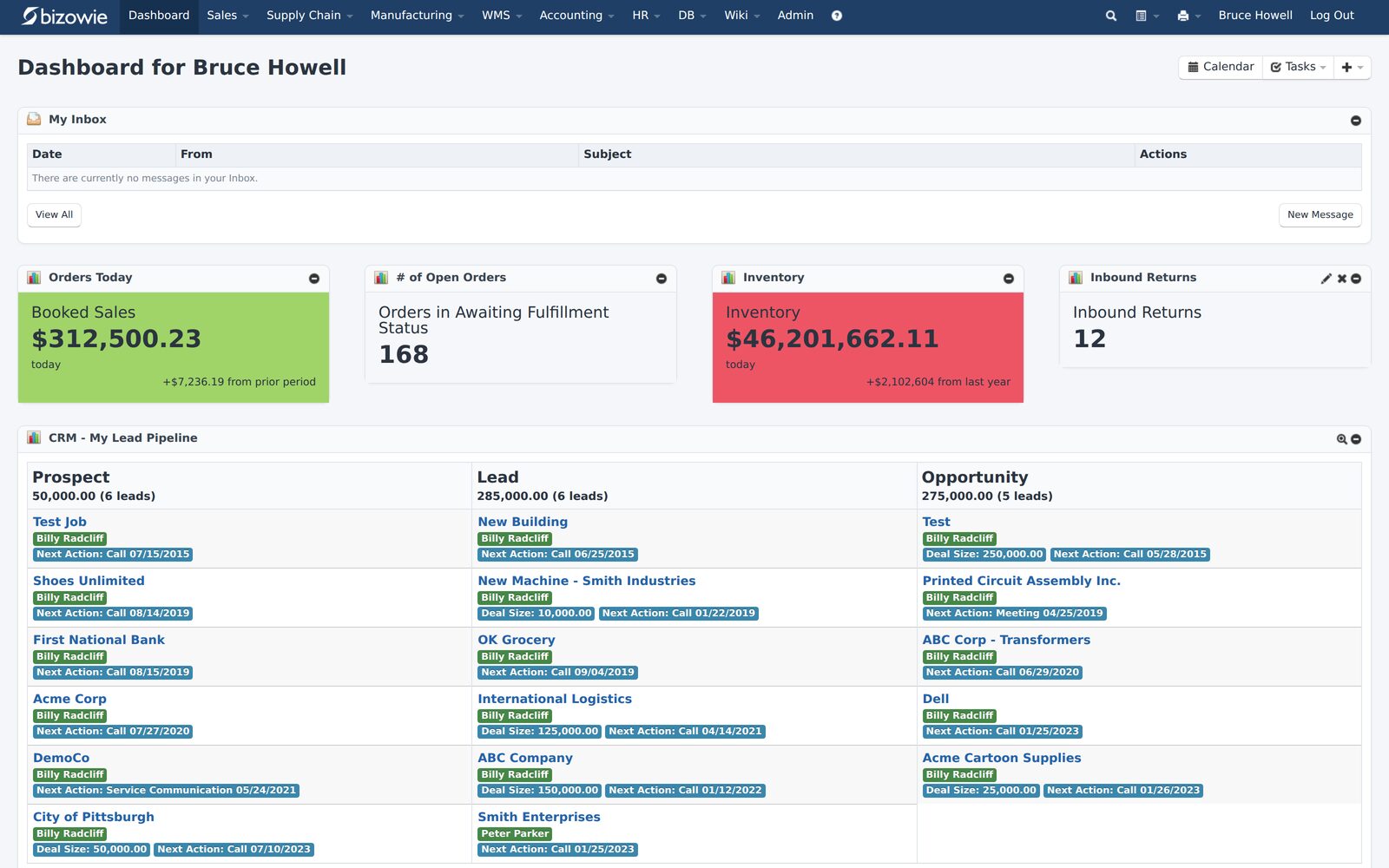
Bookings, open orders awaiting fulfillment, and inventory value at a glance.
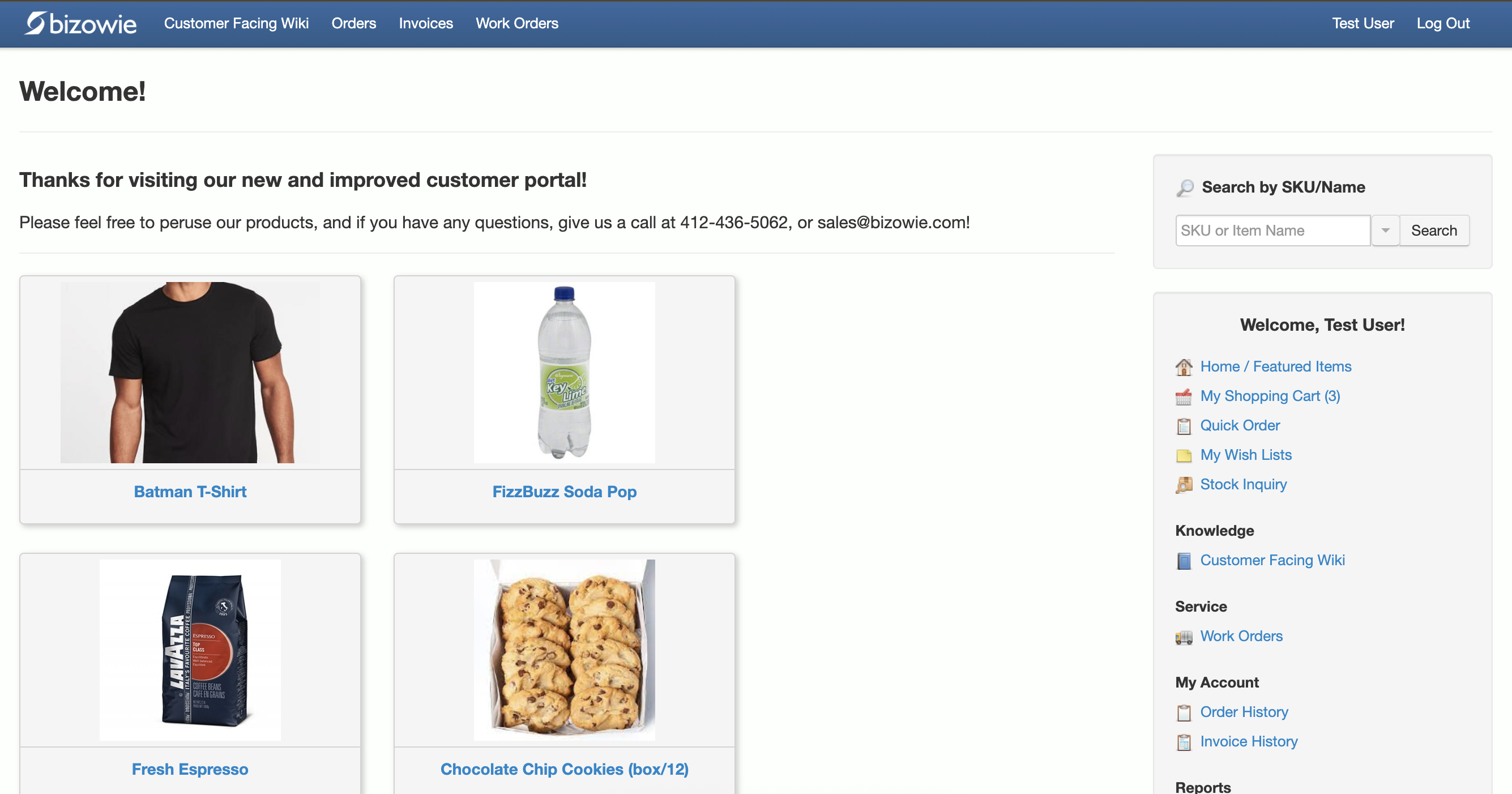
Customers search items, place orders, and check order and invoice history themselves.
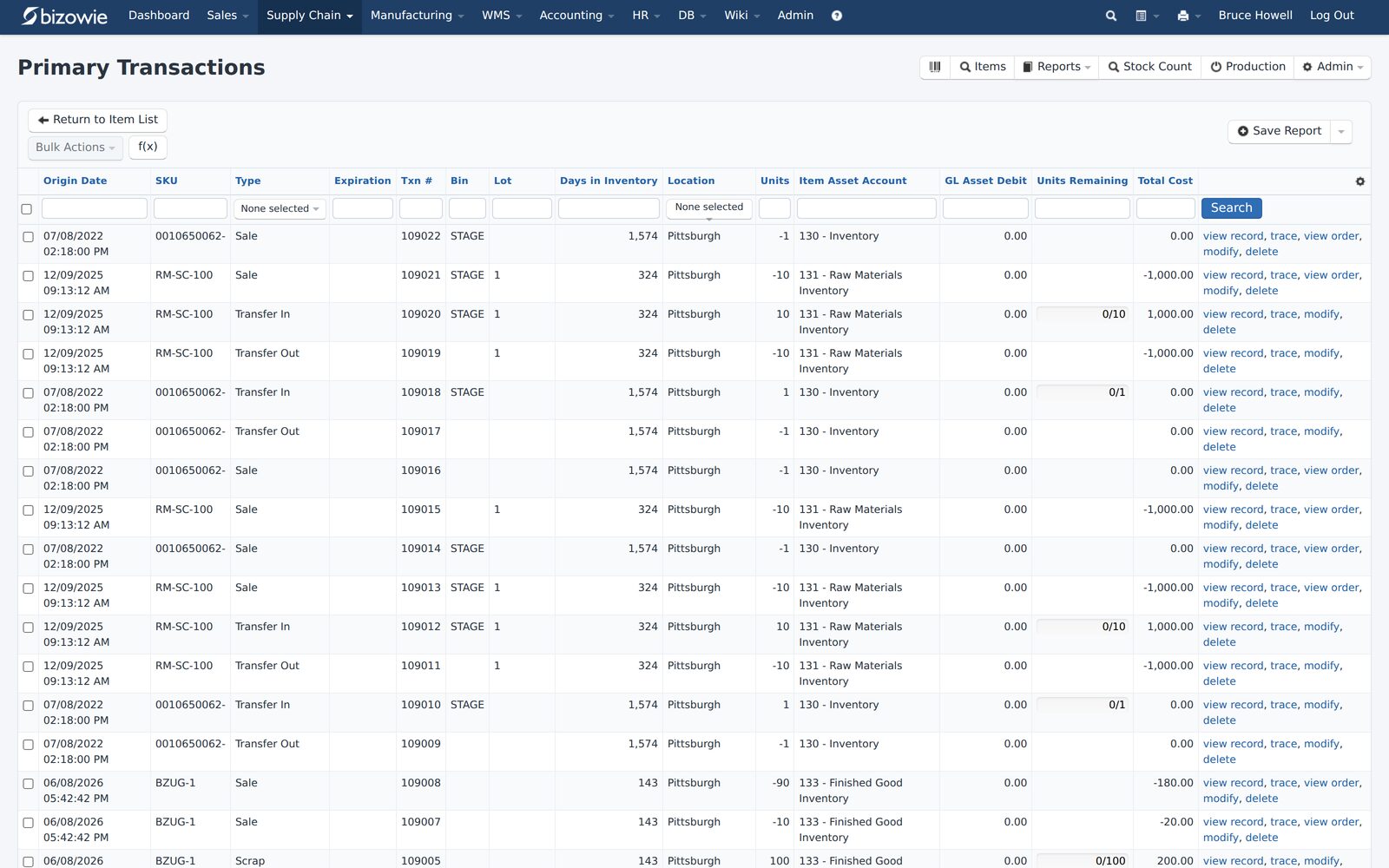
Every receipt, transfer, build, and quarantine move by SKU, lot, bin, and location.
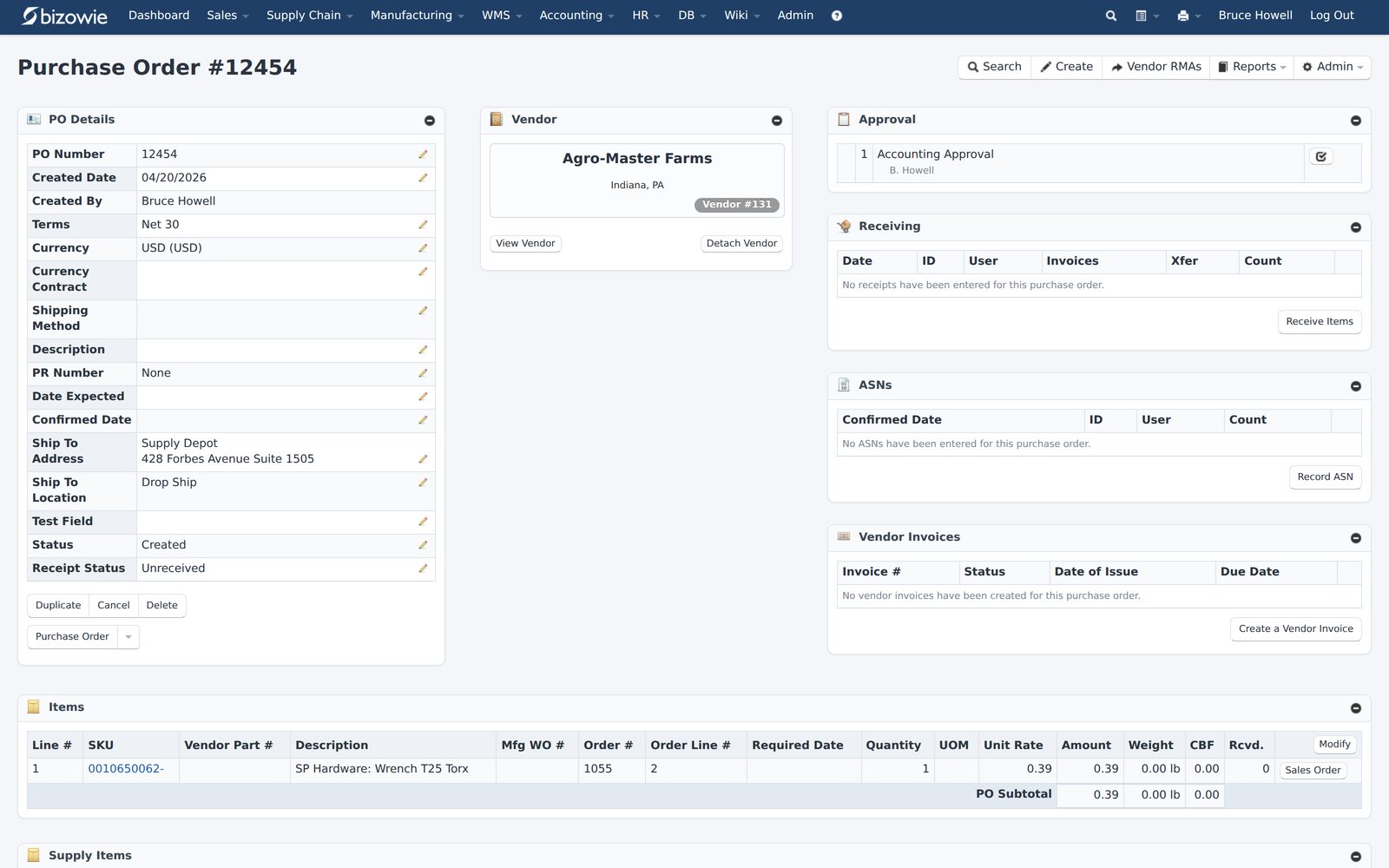
Purchase orders with approvals, receiving, ASNs, and vendor invoices on one screen.
CRM in Bizowie Cloud ERP
Bizowie Cloud CRM is a core part of Bizowie Cloud ERP, with no third-party products or integrations required. Reps get a single view of each customer: assigned reps, recent contacts with sales and customer service, and recent orders, shipments, and invoices. They can run price inquiries, generate quotes, proposals, and price lists, and manage leads and opportunities, from the office or on mobile devices. Sales management gets pipeline, forecast, and activity dashboards.
See also why your sales reps should love your ERP.
“We have seen immediate economic benefit for our business in terms of productivity from our warehouse staff, eliminated processing errors, and better stock control.”
Julius Hart — Managing Director, LensesOnline
Frequently Asked Questions
Is CRM part of ERP?
Sometimes. Some ERP systems include CRM functionality as a module; others rely on a separate CRM connected by integration. Ask whether the CRM shares the same customer, pricing, and order data as the rest of the ERP.
Do I need both ERP and CRM?
Most growing companies need both sets of capabilities: managing relationships and pipeline, and running orders, inventory, and accounting. Whether that is one system or two depends on how closely sales and operations work together.
Can a CRM replace an ERP?
No. A CRM does not manage inventory, purchasing, warehousing, production, or accounting. It records relationships and opportunities, not the transactions that run the business.
What is the main difference between ERP and CRM?
CRM focuses on customers and potential revenue. ERP focuses on operations and actual transactions: orders, inventory, fulfillment, and financials.
See Sales and Operations in One System
Bring us a real customer scenario, from quote to invoice. We’ll show you how it runs in Bizowie, and if we are not the right fit, we will tell you.
See sales and operations in one system
For manufacturers and distributors. Tell us a little about your operation and we’ll reply with an honest assessment of fit, not a sales pitch.
- A real person reviews your submission and replies within one business day.
- No automated email sequences.
- If we’re not the right fit, we’ll tell you.
Prefer to talk?
Call (888) 635-2517, Mon–Fri, 9 AM–5 PM Eastern