
NetSuite vs. QuickBooks: How They Compare for Manufacturers and Distributors
If you are comparing NetSuite vs. QuickBooks, you are probably running QuickBooks today and asking whether NetSuite is the right next step, or you are setting up systems for a growing company and deciding how much software to take on.
They are not two versions of the same thing. QuickBooks is accounting software from Intuit, extended with add-on products when a business needs more. NetSuite is a cloud ERP suite owned by Oracle, sold as an annual subscription and extended through licensed modules. Both are capable and widely used. The real question is whether your business needs accounting software or an ERP system, and if it is an ERP system, whether NetSuite is the right one.
This guide compares NetSuite vs. QuickBooks for manufacturers and distributors: what each one covers, where buyers run into trouble, and how to decide. We build a competing platform, so we have kept the comparison to what each vendor says about its own product and marked the points you should confirm directly with them.
The Quick Verdict
- QuickBooks tends to fit businesses with a stable product line, one location, and straightforward customers, where the accounting is more complex than the operations. Staying, with an add-on or two, is the lowest-disruption option.
- NetSuite tends to fit organizations that want a broad cloud suite: consolidated financials across many subsidiaries and countries, or ERP, CRM, and ecommerce from a single vendor with a large marketplace of add-on applications.
- If your problem is operational, in the warehouse or on the shop floor, moving to NetSuite does not settle it by itself. Much of its manufacturing and warehouse capability comes through modules, so get the module list for your scope in writing before comparing prices.
NetSuite vs. QuickBooks at a Glance
| Area | NetSuite | QuickBooks |
|---|---|---|
| What it is | Cloud ERP suite owned by Oracle | Accounting software from Intuit, in versions including QuickBooks Online and QuickBooks Desktop Enterprise |
| Platform approach | Broad business suite extended through licensed modules and SuiteApps | Accounting core extended through a large ecosystem of add-on products |
| Pricing model | Annual subscription combining a base license, per-user licenses, and modules; implementation is priced separately | Subscription, by product and tier |
| Financials | Strong financials with multi-subsidiary management | Accounting is the core of the product; multi-entity financial management is offered in Intuit Enterprise Suite |
| Orders and purchasing | Order management and purchasing in the core suite | Sales orders and purchase orders in QuickBooks Desktop Enterprise |
| Inventory | Inventory across multiple locations, demand planning, and distribution requirements planning | Inventory tracking in higher QuickBooks Online levels; in Enterprise, Advanced Inventory adds multiple sites, bin-level tracking, and lot or serial tracking |
| Manufacturing | Bills of material, assembly items, work orders, and routings with work-in-process tracking; more through Advanced Manufacturing | Inventory assembly items, which act as a simple bill of materials; no routings or work centers |
| Planning | MRP through demand planning and advanced inventory features | Usually done in a spreadsheet or an add-on product |
| Warehouse management | WMS module with mobile barcode scanning, put-away and picking strategies, wave picking, and cycle counting | Barcode scanning through Advanced Inventory; directed warehouse workflows usually come from an add-on product |
| EDI | Ask whether it is native, a module, a SuiteApp, or a third-party product | Typically handled by a third-party EDI provider connected to QuickBooks |
| Extending it | SuiteCloud platform, including scripting and a large SuiteApp marketplace | Add-on products for inventory, warehousing, EDI, manufacturing, and planning |
| Implementation | NetSuite professional services or Solution Provider partners | Familiar to most accountants; each add-on is set up and connected separately |
| Often the best fit | Organizations that value a broad suite, global multi-subsidiary financials, and a large ecosystem | Businesses with a stable product line, one location, and straightforward customers |
Product details come from our NetSuite comparison page and our Outgrowing QuickBooks guide, which reflect publicly available vendor information reviewed in September 2026. Capabilities, packaging, pricing, and deployment options can change, so validate your specific requirements with each vendor. NetSuite and Oracle are trademarks of Oracle and/or its affiliates. QuickBooks and Intuit are trademarks of Intuit Inc. Bizowie is not affiliated with or endorsed by these companies.
Accounting Software vs. ERP: The Real Difference
QuickBooks is built around transactions: an invoice, a bill, a payment, a journal entry. It records what happened and what it was worth. That is what accounting software is for, and QuickBooks does it well.
An ERP system is built around the operation that produces those transactions. A sales order is priced, allocated against inventory in a specific warehouse, picked, packed, shipped, and invoiced. A production job is planned, released, and reported against as it moves through the plant. The accounting entries are a result of those steps, not a separate task.
The difference is easiest to see when something goes wrong. In an accounting system supported by spreadsheets, finding out why an order shipped short or why a job lost money means reconstructing events from several places. In an ERP system, the events are already connected to each other.
So the first question is not which product is better. It is whether your accounting or your operations is the harder problem. If it is the accounting, more accounting capability may be all you need. If it is the operations, you are choosing an ERP system, and NetSuite is one of several to compare.
QuickBooks: Who It Fits and Where Buyers Run Into Trouble
Almost every growing manufacturer and distributor starts on QuickBooks, and for good reason. It is affordable, and your accountant already knows it. It also does more for product businesses than many people assume.
QuickBooks Desktop Enterprise includes a Manufacturing and Wholesale edition. It supports sales orders, purchase orders, and inventory assembly items, which act as a simple bill of materials so you can build finished goods from components. Advanced Inventory, available in the Enterprise Platinum and Diamond tiers, adds multiple inventory sites, barcode scanning, bin-level tracking, and lot or serial tracking. Enterprise also supports landed cost. Around all of this sits a large ecosystem of add-on products for inventory, warehousing, EDI, manufacturing, and planning.
QuickBooks is often a fit when:
- You have a stable product line, one location, and straightforward customers
- Your operations are simple enough that one or two add-ons cover the gaps
- You want to keep your accounting where it is and avoid a large change
Where buyers run into trouble:
- Production. Building an assembly converts components into finished goods in a single step. It is not a work order that is released, scheduled, partially completed, and closed. QuickBooks does not model routings, work centers, or capacity, so planning usually happens in a spreadsheet.
- Job cost. Material, labor, and overhead do not accumulate against a job while it runs, so job cost and work in process are reconstructed after the fact.
- Multiple warehouses. Allocation, transfers, and backorders across locations quickly outgrow the model.
- Pricing. Customer-specific prices, contract pricing, quantity breaks, and promotions tend to end up in spreadsheets.
- EDI. EDI is typically handled by a third-party provider connected to QuickBooks, which adds another system to keep in sync.
- The add-on stack. Every product added around QuickBooks has to stay in sync with the others, and every month-end involves reconciling what each system believes happened.
If several of those sound familiar, our Outgrowing QuickBooks guide has a 12-sign check and a plan for the move.
NetSuite: Who It Fits and Where Buyers Run Into Trouble
NetSuite is one of the best-known cloud ERP systems in the world. Its core covers financials, order management, inventory, purchasing, and CRM, with additional modules for manufacturing, warehouse management, ecommerce, planning, and global multi-subsidiary operations. Its strength is breadth: one suite across many industries, with a large ecosystem of partners and add-on applications.
For manufacturers, NetSuite supports bills of material, assembly items, work orders, and routings with work-in-process tracking. Advanced Manufacturing adds engineering change management, a product configurator, operation-level shop floor data collection, and finite-capacity production scheduling. For distributors, NetSuite supports inventory across multiple locations, demand planning, and distribution requirements planning, and its WMS module adds mobile barcode scanning, put-away and picking strategies, wave picking, and cycle counting.
NetSuite is often a fit when:
- You operate many subsidiaries across countries and need consolidated global financials
- You want ERP, CRM, and ecommerce from a single vendor
- Your manufacturing or distribution requirements are well covered by the modules in your proposal
- A large marketplace of add-on applications is important to you
- You value the backing and scale of Oracle
Where buyers run into trouble:
- Module scope. Much of NetSuite’s manufacturing and warehouse capability is delivered through modules, so capability and cost both depend on what you license. Two companies can receive very different proposals.
- Per-user licensing. If you want operators, supervisors, and warehouse staff working in the system and not on paper, ask exactly how each of those people will be licensed.
- Renewals. Ask what the subscription will cost at your first and second renewal, in writing.
- Scripted customizations. Every script and SuiteApp is something your team or partner must maintain as the platform releases new versions.
If NetSuite is on your shortlist next to another cloud ERP system, see our comparison of NetSuite vs. Acumatica.
QuickBooks Online, Enterprise, and Intuit Enterprise Suite
“QuickBooks” covers several products, and which one you are comparing with NetSuite changes the answer.
- QuickBooks Online offers inventory tracking in its higher subscription levels, including assembly items.
- QuickBooks Desktop Enterprise is where most of the product-business capability sits: the Manufacturing and Wholesale edition, Advanced Inventory in the Platinum and Diamond tiers, and landed cost.
- Intuit Enterprise Suite is a cloud platform aimed at larger businesses, with multi-entity financial management and industry-specific dashboards.
Many businesses are re-evaluating QuickBooks for a reason that has nothing to do with growth. On September 30, 2024, Intuit stopped selling new subscriptions of QuickBooks Desktop Pro Plus, Premier Plus, and Mac Plus to new customers in the United States. Existing subscribers can continue to renew, and QuickBooks Desktop Enterprise remains available. Check Intuit’s current policy for your version.
If your main pain is financial, such as multiple entities, consolidation, and reporting, Intuit Enterprise Suite is designed for that, and so are NetSuite’s multi-subsidiary financials. If your problems are in the warehouse or on the shop floor, evaluate carefully how well either one covers them before choosing.
The Add-On Stack vs. the Module List
QuickBooks and NetSuite reach the functions a manufacturer or distributor depends on in different ways, and each has its own cost.
With QuickBooks, the usual answer to a gap is another product: an inventory or warehouse tool, an EDI provider, a manufacturing or planning tool, a pricing spreadsheet. That is a legitimate strategy, and for many growing businesses it is the right intermediate step. Its cost grows with the business, because every connection has to be kept in sync and can fail. We cover this in the integration tax nobody talks about.
With NetSuite, capability such as warehouse management and advanced manufacturing comes as modules you license, alongside SuiteApps from its marketplace. The work becomes defining scope: which modules, at what cost. Before comparing prices, get a written answer on what each of these requires:
- Multi-level bills of material and routings
- Work-in-process tracking and job costing
- Material requirements planning
- Finite-capacity scheduling and shop floor data collection
- Lot or serial traceability
- Customer-specific and contract pricing
- Warehouse management: receiving, put-away, picking, packing, and cycle counts
- EDI with your trading partners
For each item, ask whether it is native, a module, an add-on, or a separate product with its own contract, and who supports it. Comparing a partial proposal against a complete one is the most common way ERP budgets are misjudged.
How to Choose Between Them
- List what runs outside QuickBooks. Write down every add-on, integration, and spreadsheet your operation depends on, and who maintains each one. That list is your real requirement, whichever way you go.
- Decide whether the problem is accounting or operations. If your add-ons are few and stable and the pain is in consolidation and reporting, staying in the Intuit family may be the right answer. If inventory, pricing, warehouse activity, production, or job cost live outside the system, you need an ERP system.
- Compare more than one ERP system. NetSuite serves many industries. Compare it with platforms where manufacturing and distribution are the core focus, using the same requirements list.
- Price the same scenarios. Ask each vendor to price your business as it runs today, with 30% more users and transactions, and after adding a location or entity. Include every module or add-on, implementation, and the cost at your first and second renewal.
- Run your own scenarios live. Price an order with contract pricing and quantity breaks. Allocate limited stock across two warehouses. Receive, put away, pick, pack, and ship by scanner. Report labor and quantity from the shop floor without rekeying. Use only what is in each proposal.
- Plan the migration honestly. Clean up item data first. Most businesses bring opening balances, open orders, open payables and receivables, and master data, and keep QuickBooks available in read-only mode for history. Price lists, bin locations, EDI setups, and routings that exist only in spreadsheets need to be gathered and defined.
For the cost side, our manufacturing ERP total cost of ownership guide walks through what to include, and our guide to ERP contract negotiation covers what to settle before you sign.
See Bizowie in Action
Real screens from Bizowie, not mockups. Click any screen to enlarge.
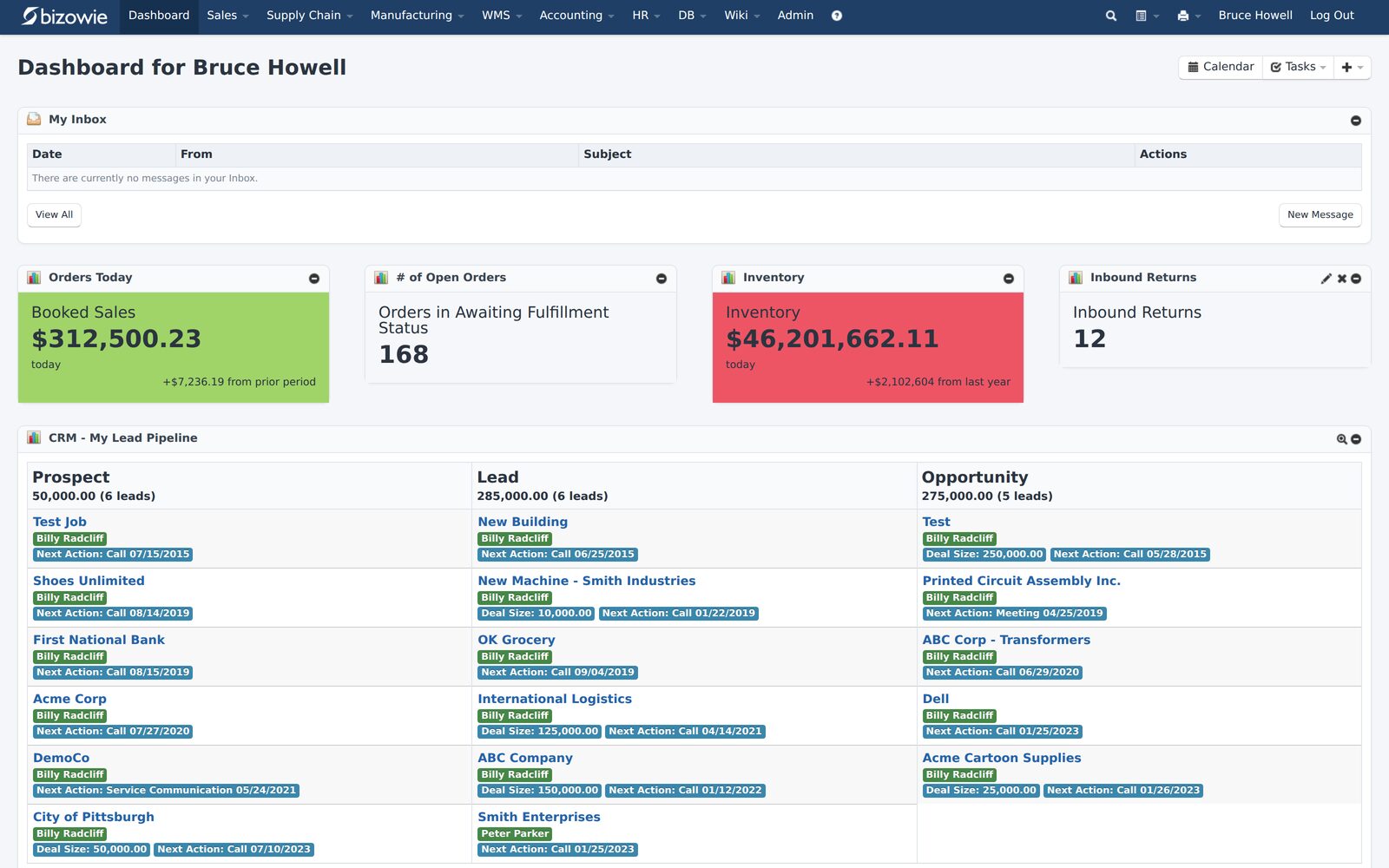
Bookings, open orders awaiting fulfillment, and inventory value at a glance.
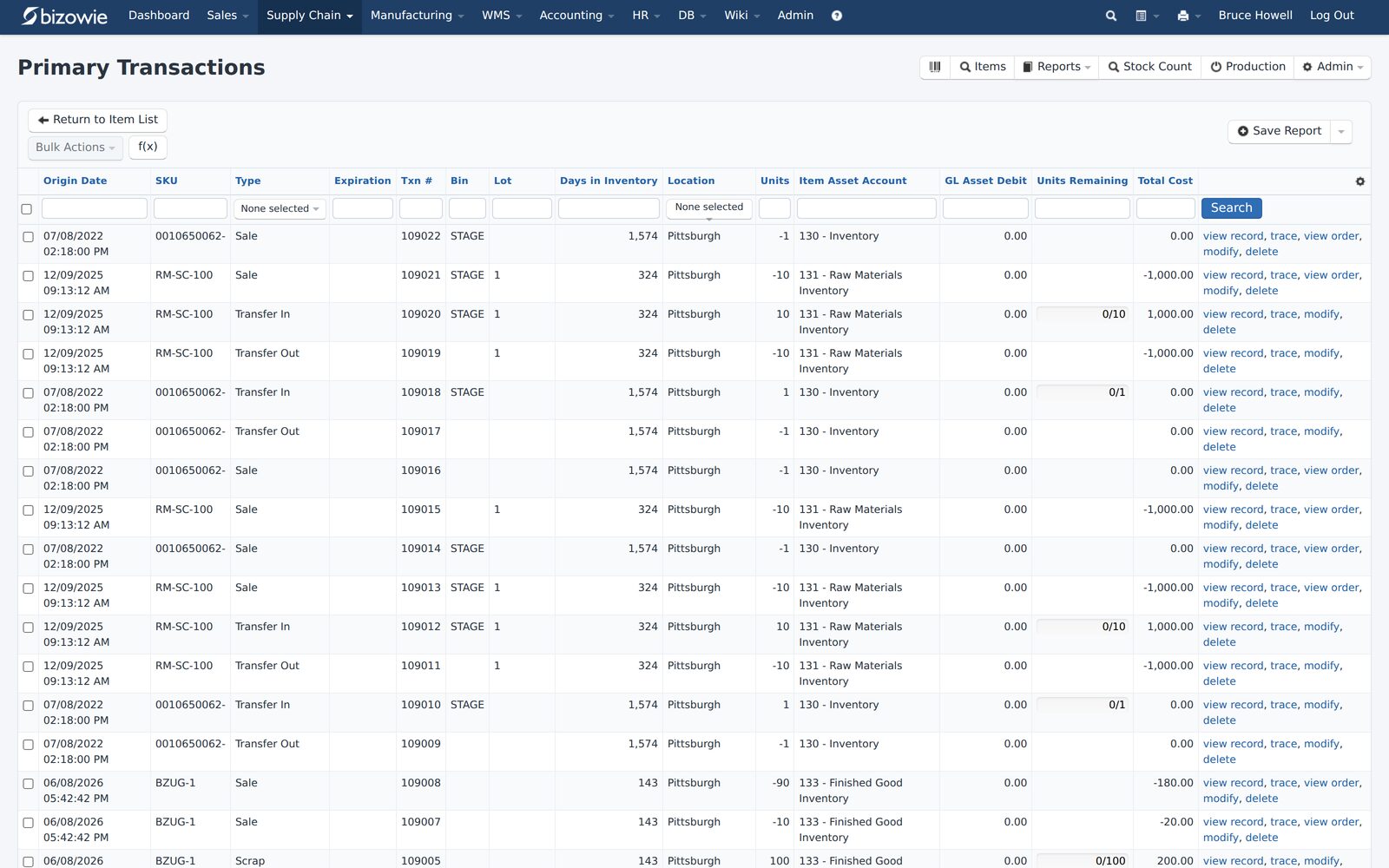
Every receipt, transfer, build, and quarantine move by SKU, lot, bin, and location.
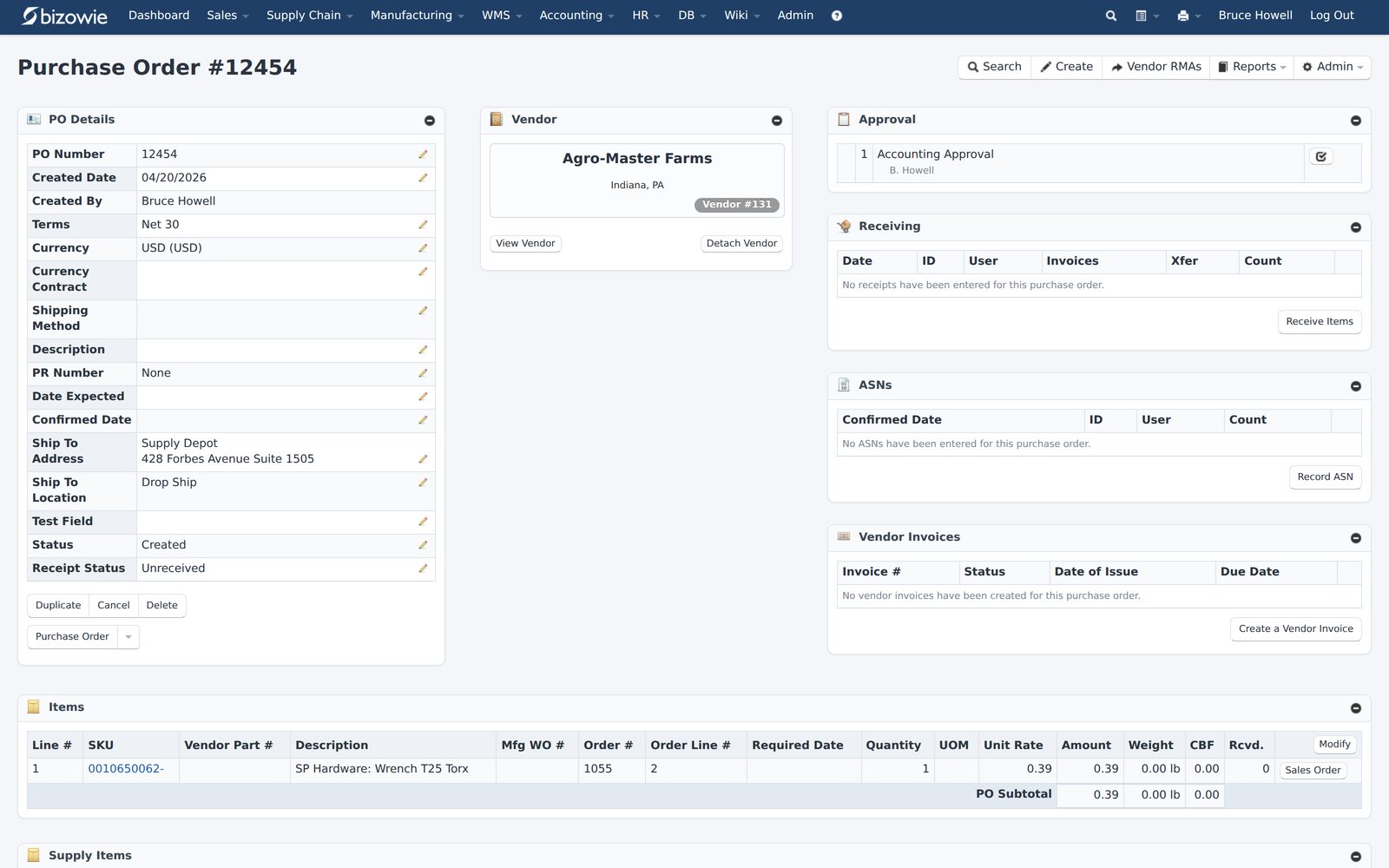
Purchase orders with approvals, receiving, ASNs, and vendor invoices on one screen.
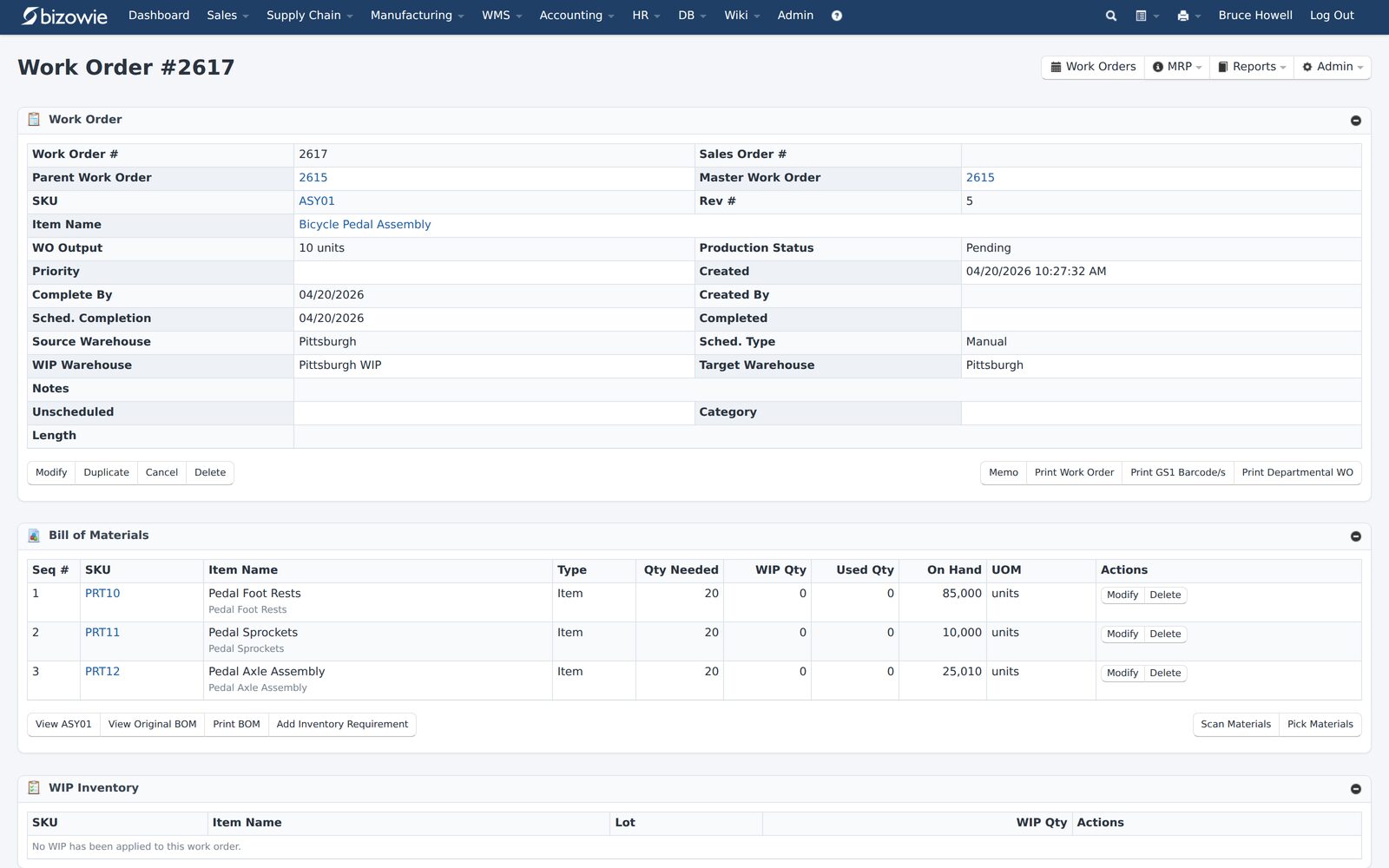
Each work order carries its multi-level bill of materials, batches, and live on-hand quantities.
A Third Option: Bizowie
If the reason you are comparing NetSuite and QuickBooks is that inventory, warehouse work, EDI, pricing, or production have moved into add-ons and spreadsheets, it is worth looking at a platform where those functions are native. Bizowie is a cloud ERP platform built for mid-market manufacturers and distributors. Manufacturing, inventory, barcode-driven warehouse management, direct ANSI X12 EDI, customer-specific pricing, and financials run in one environment, so a scan in the warehouse, an EDI order, a production completion, and the general ledger all describe the same transaction. Bizowie delivers the platform as a cloud service, and the team that builds it also implements and supports it. It is not the right choice for everyone: if your operations are simple and QuickBooks covers them, staying is the lower-disruption answer, and if global multi-subsidiary financials is your first requirement, NetSuite is built for it. For what to test in any system, see our buyer’s guides to manufacturing ERP software and distribution ERP software.
“What used to take us 30 to 45 minutes can now be done in 3 to 5 minutes.”
Bridget Gaussa — Director of Program Development, Cribs for Kids
Frequently Asked Questions
What is the difference between NetSuite and QuickBooks?
QuickBooks is accounting software from Intuit, extended with add-on products for functions such as warehousing, EDI, and manufacturing. NetSuite is a cloud ERP suite owned by Oracle that covers financials, order management, inventory, purchasing, and CRM, with licensed modules for manufacturing, warehouse management, and more.
Is NetSuite better than QuickBooks?
They do different jobs. QuickBooks fits businesses whose operations are simple and whose main need is accounting. NetSuite fits organizations that need a broad business suite. For a manufacturer or distributor, the better question is which system handles your own orders, warehouse work, and production, with every required module or add-on priced.
When should a company move from QuickBooks to NetSuite or another ERP?
When operational complexity, not accounting, is what limits you: when inventory, pricing, warehouse activity, production, or job costs live outside the system, and reconciling them takes more time every month.
Can QuickBooks handle manufacturing and distribution?
For simpler operations, yes. QuickBooks supports inventory assemblies and builds, and QuickBooks Desktop Enterprise with Advanced Inventory supports multiple sites, barcode scanning, bin tracking, and lot or serial tracking. Companies with routings, production planning, complex pricing, EDI trading partners, or multi-warehouse allocation usually need add-on products or an ERP system.
How is NetSuite priced compared with QuickBooks?
NetSuite is typically sold as an annual subscription combining a base platform license, per-user licenses, and individual modules, with implementation priced separately. QuickBooks is sold by subscription, by product and tier, and each add-on product is priced by its own vendor. Ask for both to be priced against the same scenarios, including renewals.
Is QuickBooks Desktop being discontinued?
Intuit stopped selling new subscriptions of QuickBooks Desktop Pro Plus, Premier Plus, and Mac Plus to new US customers on September 30, 2024. Existing subscribers can continue to renew, and QuickBooks Desktop Enterprise is still available. Check Intuit’s current policy for your version.
What happens to our QuickBooks history if we move?
Most businesses migrate balances, open transactions, and master data, and keep QuickBooks available in read-only mode for historical reference.
Bring Us Your Add-On List
Tell us what QuickBooks and the add-ons and spreadsheets around it do today, and the order or production job that is hardest to run. We’ll show you how Bizowie handles it, and if you are not ready to move yet, we will tell you that too.
See how Bizowie would replace QuickBooks and its add-ons
Tell us a little about your operation and we’ll reply with an honest assessment of fit, not a sales pitch.
- A real person reviews your submission and replies within one business day.
- No automated email sequences.
- If we’re not the right fit, we’ll tell you.
Prefer to talk?
Call (888) 635-2517, Mon–Fri, 9 AM–5 PM Eastern