
How Much Does ERP Cost? A Pricing Guide for Mid-Market Companies
Ask an ERP vendor what their software costs and you will usually get a per-user subscription price. Ask a company that has been through an ERP project what it cost and you will get a very different number.
The gap between the two is the rest of the budget: implementation, data migration, integrations, training, support, add-on modules, upgrades, and the time your own people spend on the project. On many projects those costs add up to more than the software itself.
This guide covers how much ERP costs for a mid-market manufacturer or distributor: what goes into the price, how ERP software is priced, where implementation budgets go, the costs buyers most often miss, and how to get a quote you can actually compare.
What Drives ERP Cost
Two companies of the same size can get ERP quotes that are far apart. The difference usually comes from a handful of factors:
- Users: how many people use the system, and in what roles. Warehouse, shop floor, and occasional users may be priced differently from full users.
- Functionality: whether what you need is in the core product or sold as add-on modules, such as warehouse management, manufacturing, EDI, or advanced reporting.
- Complexity: the number of locations, legal entities, currencies, and integrations, and how unusual your processes are.
- Data: how many systems you are migrating from, how much history you bring, and how clean it is.
- Deployment: true multi-tenant SaaS, single-tenant cloud, hosted, or on-premise, which changes who pays for infrastructure and upgrades.
- Implementation model: whether the vendor implements its own software, or a third-party consulting firm or reseller does.
The Cost Categories in an ERP Budget
A complete ERP budget has more lines than a vendor proposal. Use this list to make sure each quote covers the same things:
| Cost | One-time or recurring | What drives it |
|---|---|---|
| Software subscription or license | Recurring (subscription) or up front plus annual maintenance (perpetual license) | Users, user types, modules, entities |
| Implementation services | One-time | Scope, complexity, implementation model |
| Data migration | One-time | Number of source systems, history, data quality |
| Integrations | One-time build, recurring maintenance | E-commerce, EDI trading partners, carriers, payment processors |
| Training | One-time, plus ongoing for new hires | Number of users and roles, turnover |
| Support | Recurring | Whether it is included or sold in tiers |
| Upgrades | Periodic | Whether updates are included or require upgrade projects |
| Infrastructure and IT time | Recurring | Who hosts and administers the system |
| Internal time | One-time, during the project | Staff time on requirements, testing, and training |
How ERP Software Is Priced
Most ERP vendors use one of these models, or a mix of them:
- Per-user subscription: a monthly or annual price for each user. It is the most common model for cloud ERP and the easiest to budget. Ask how users are counted (named, concurrent, or active) and whether different user types are priced differently.
- Tiered packages: levels such as Starter, Professional, and Enterprise, each with more modules and features. Map your real requirements to the tiers, because the functionality you need may sit one tier higher than the one you were quoted.
- Module-based pricing: a base platform plus separately priced modules. Specialized capabilities that not every company needs are reasonable as modules. Core operations such as multi-location inventory, order management, purchasing, and financials should not be.
- Revenue- or transaction-based pricing: the price rises with your sales, orders, or transactions. It can be hard to forecast and can weigh heavily on high-volume, lower-margin distributors.
- Perpetual license: a large up-front license fee plus annual maintenance, usually for on-premise software, with servers, upgrades, and IT support on your side of the ledger.
The per-user price alone tells you little. A vendor quoting $150 per user per month and one quoting $250 can end up with very different totals once add-on modules, paid upgrades, and premium support are counted. For a deeper look at subscription pricing, see what cloud ERP is and how it works.
Implementation: The Biggest One-Time Cost
For most projects, implementation is the largest one-time cost and the one most likely to grow. It covers configuring the system, migrating data, building integrations, testing, and training.
In the traditional model, a third-party systems integrator or consulting firm does this work and bills by the hour, day, or phase. For mid-market distribution companies, implementation under that model typically runs one to three times the first year’s subscription. Because the firm earns more when the project runs longer or the scope grows, change orders are a common source of overruns.
To keep implementation cost under control:
- Get a written statement of work with deliverables, assumptions, and what is out of scope.
- Name every integration and every data set to be migrated, with who is responsible for each.
- Tie payments to accepted milestones, not hours spent.
- Ask who actually does the work: the software vendor, a reseller, or a consulting partner.
- Clean your data before migration, not during it. See data migration for distribution ERP.
For what goes wrong and how to avoid it, see ERP implementation by the numbers. For the schedule, see how long ERP implementation takes.
The Costs Buyers Most Often Miss
These costs rarely appear on a pricing page, and they are where five-year budgets go wrong:
- Upgrades: true multi-tenant SaaS platforms update continuously as part of the subscription. Single-tenant cloud, hosted, and on-premise systems often need periodic upgrade projects with their own services fees.
- Integration maintenance: integrations can break when either system changes or a trading partner changes its EDI specifications. Budget for upkeep, not just the initial build.
- Add-on modules: warehouse management, EDI, advanced reporting, or manufacturing may be priced separately. Check what is included before you compare prices.
- Premium support: faster response times and phone access are often sold as a premium tier, commonly 15% to 25% on top of the base subscription.
- Growth: new users, locations, and entities. Ask whether pricing for additions is locked, and whether you can reduce at renewal.
- Renewal increases: without a cap in the contract, the subscription can rise at every renewal.
- Your team’s time: the people who define requirements, test, and train are also running the business while the project is underway.
Manufacturers have their own cost drivers, from shop floor users to scheduling and quality. See our manufacturing ERP total cost of ownership guide.
An Example Five-Year Budget
Here is how the numbers can add up for a mid-market distributor with 30 users, using the traditional consultant-led model. It is an illustration of the math, not a quote, and real numbers vary widely.
- Subscription: 30 users at $200 per user per month is $72,000 a year, or $360,000 over five years before any growth or renewal increases.
- Implementation: at one to three times the first year’s subscription, $72,000 to $216,000.
- Premium support, if needed: 15% to 25% of the subscription, or $54,000 to $90,000 over five years.
- Plus: add-on modules, integration maintenance, upgrade projects if the platform needs them, training for new hires, and additional users as you grow.
In this example the subscription is less than half of the five-year total. That is why the vendor with the lowest per-user price is not always the least expensive choice.
Cloud vs. On-Premise Cost
On-premise ERP shifts costs onto you: the license up front, then servers, backups, security, upgrades, and the IT staff to run them. Cloud ERP turns most of that into a predictable subscription, and true SaaS includes updates. The accounting treatment differs too, since a subscription is generally an operating expense while a license and servers are usually capital spending. See ERP TCO: cloud vs. on-premise over 10 years and cloud ERP as OpEx vs. CapEx.
The other side of the budget is what your current system already costs you in workarounds, errors, and lost time. See the hidden cost of not upgrading your ERP.
See Bizowie in Action
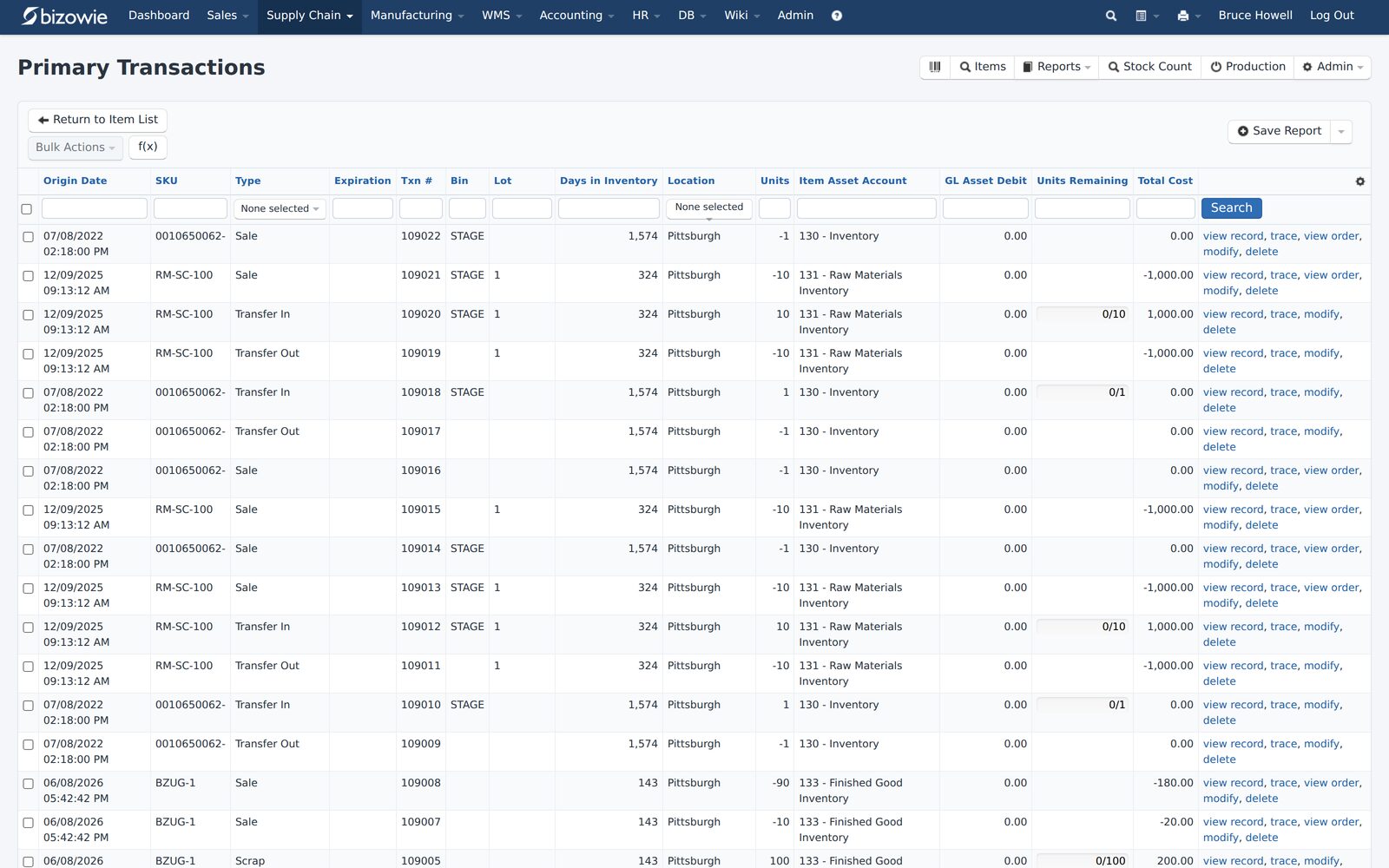
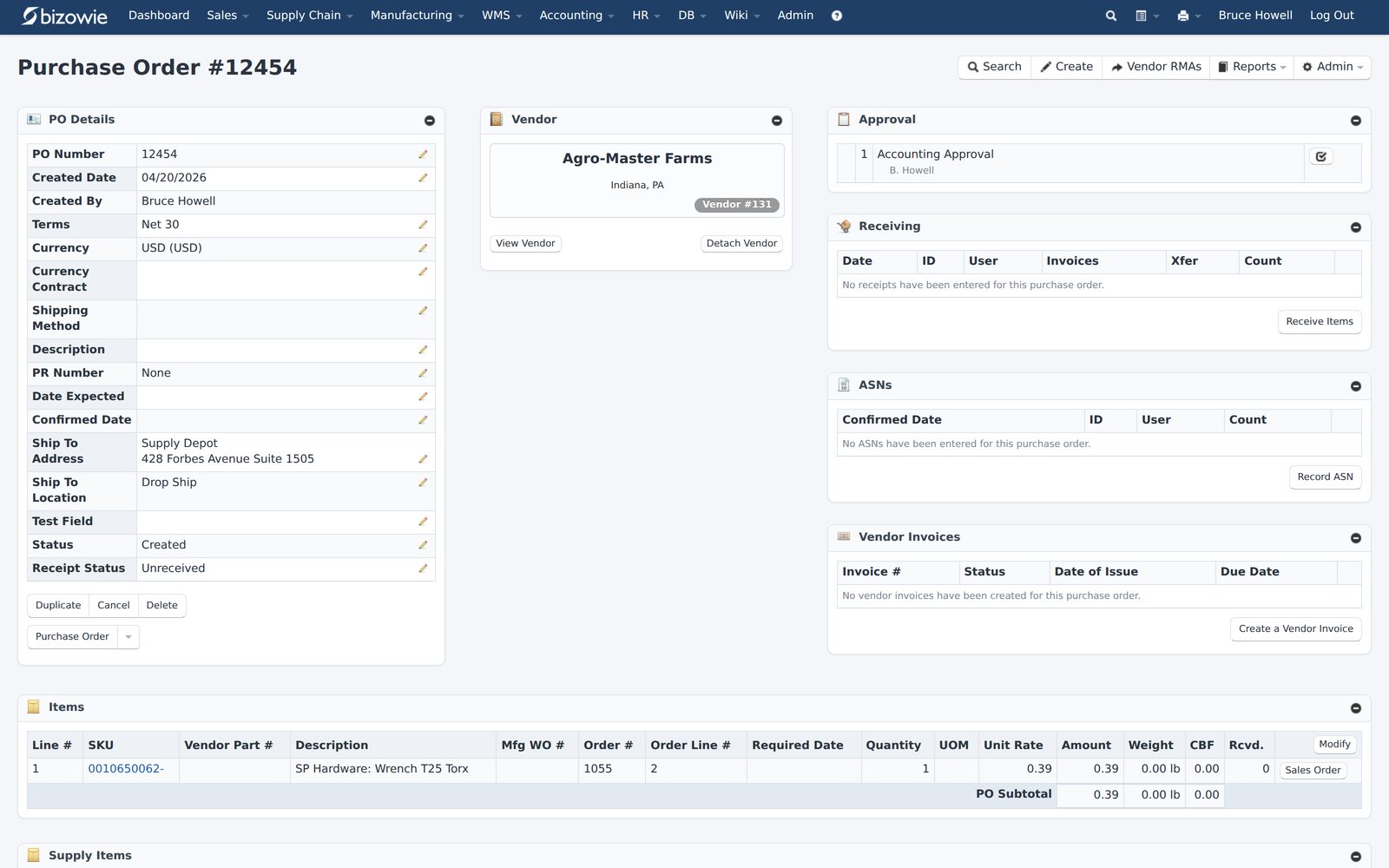
Real screens from Bizowie, not mockups. Click any screen to enlarge.
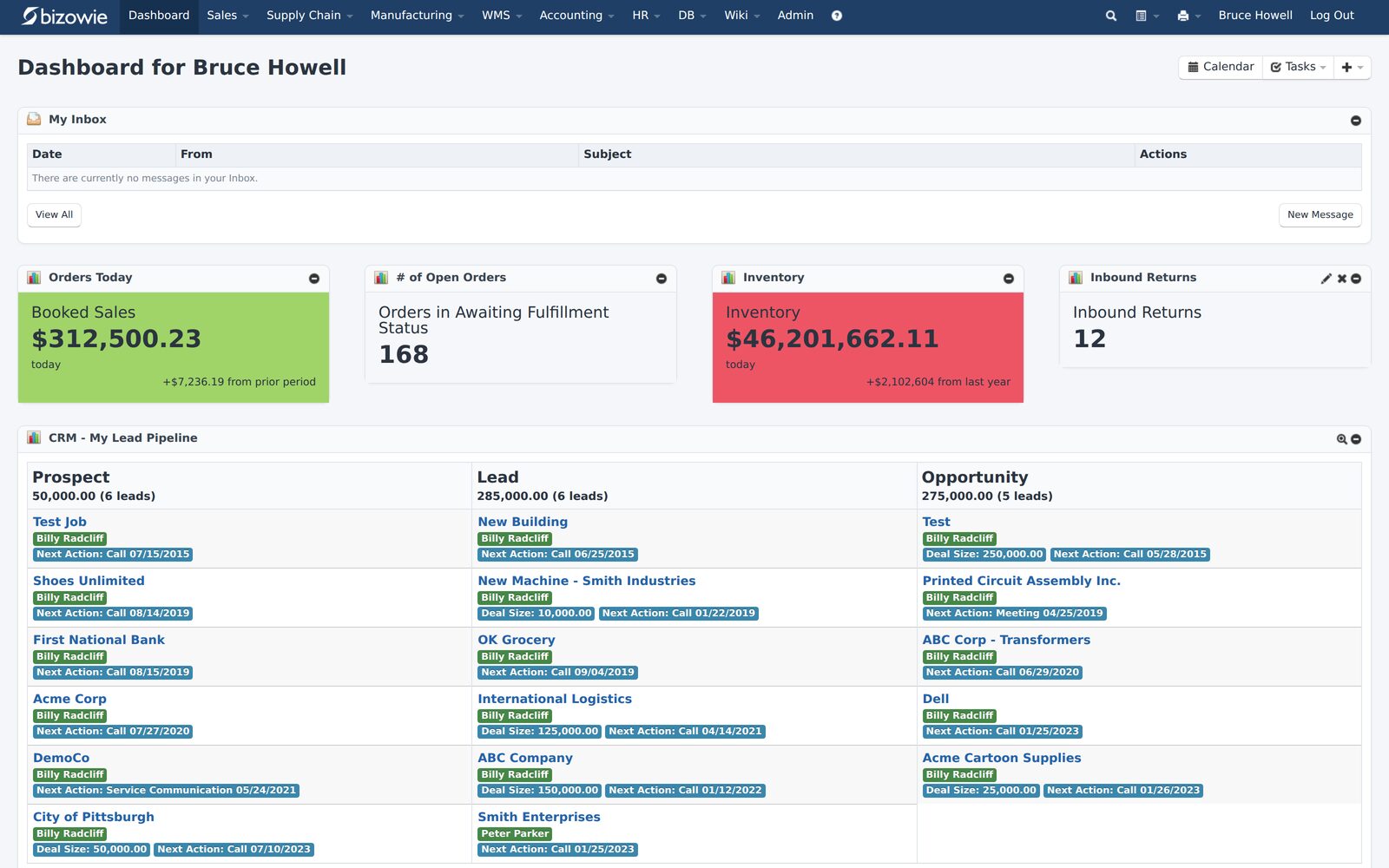
Bookings, open orders awaiting fulfillment, and inventory value at a glance.
Every receipt, transfer, build, and quarantine move by SKU, lot, bin, and location.
Purchase orders with approvals, receiving, ASNs, and vendor invoices on one screen.
How to Get an Accurate ERP Price
- Define your scope in writing: users by role, locations, entities, modules, integrations, and the data you will migrate. The ERP RFP template gives you a structure.
- Send every vendor the same scope, so the quotes price the same thing.
- Ask for a five-year cost, not just year one, including implementation, support, and expected growth. Ask which numbers are estimates and which are committed.
- Ask what is not included: modules, integrations, support tiers, upgrades, and training.
- Watch a demo of your own scenarios, so you know the functionality you are paying for actually exists. See how to approach an ERP demo.
- Check references on whether the project came in on budget. See ERP reference check questions.
- Negotiate the terms that drive future cost, such as renewal caps and pricing for additions. See ERP contract negotiation.
For the full selection process, see how to choose an ERP system.
“From our first contact all the way through to our implementation, Bizowie has been a first class organization to work with… We strongly recommend the Bizowie software program.”
Alan Seymour — President, Cleveland Electric Labs
How Bizowie Approaches Pricing
Bizowie charges per active user, so you pay for what you use. There are user minimums to ensure every deployment has the scale to succeed, and beyond that, billing is predictable and scales with your team.
As a true multi-tenant SaaS platform, continuous updates are included: there are no upgrade projects, no version migration fees, and no consulting engagements required to stay current. Core distribution functionality, including inventory across locations, EDI, complex pricing, lot tracking, order management, purchasing, and financials, is built into the platform. Advanced distribution (warehouse management) and manufacturing are available as separate modules for businesses that need that depth.
Bizowie is sold and implemented directly by the team that builds and supports the software, so one company is accountable for the software, the implementation, and support. Ask us to price your scope, and compare it on a five-year basis.
Frequently Asked Questions
How much does ERP cost?
It depends on users, functionality, complexity, and the implementation model. Most cloud ERP is priced per user per month, and implementation is a separate one-time cost that, with the traditional consultant-led model, often runs one to three times the first year’s subscription. Compare total cost over five years.
How is ERP software priced?
Usually as a per-user subscription, sometimes with tiered packages, separately priced modules, or pricing tied to revenue or transactions. On-premise software is typically a perpetual license plus annual maintenance.
What is the biggest hidden cost of ERP?
Implementation is the largest cost most buyers underestimate. After that, the most common surprises are add-on modules, integration maintenance, premium support, and upgrade projects on platforms that do not update continuously.
Is cloud ERP cheaper than on-premise?
Often, over the full life of the system, because the subscription covers infrastructure and, with true SaaS, updates. Compare the two on total cost of ownership, not the first-year price.
What is ERP total cost of ownership?
Everything you will spend on the system over a set period, usually five years: subscription or license, implementation, data migration, integrations, training, support, upgrades, infrastructure, and internal time.
Get a Price for Your Scope
Tell us about your operation. We’ll walk you through what Bizowie would cost for your users and scope, and if we are not the right fit, we will tell you.
Get a Bizowie price for your scope
For manufacturers and distributors. Tell us a little about your operation and we’ll reply with an honest assessment of fit, not a sales pitch.
- A real person reviews your submission and replies within one business day.
- No automated email sequences.
- If we’re not the right fit, we’ll tell you.
Prefer to talk?
Call (888) 635-2517, Mon–Fri, 9 AM–5 PM Eastern