
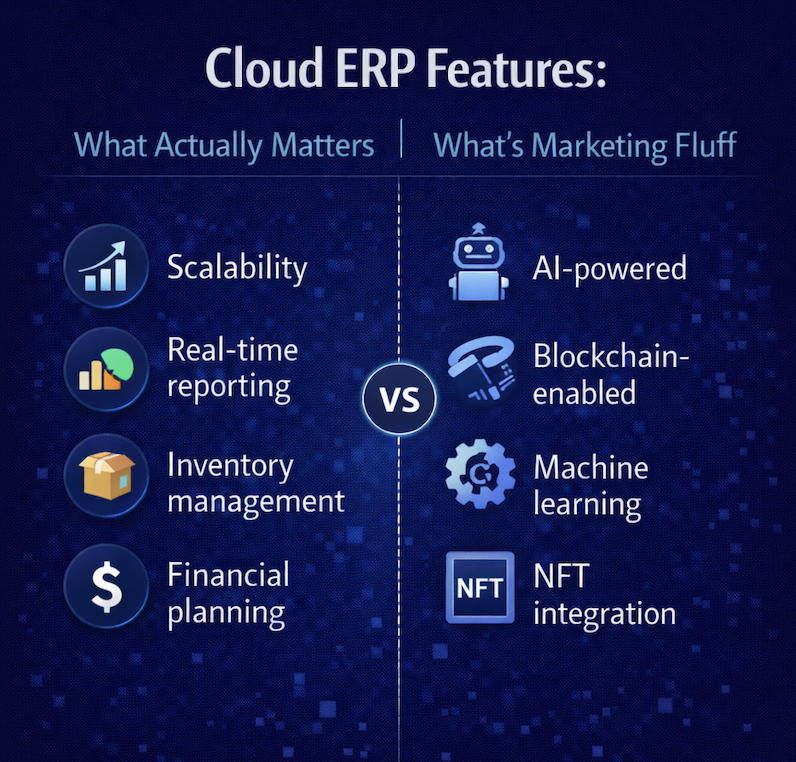
Cloud ERP Features: What Actually Matters vs. What’s Marketing Fluff
Every cloud ERP vendor has a features page. It’s long, it’s comprehensive, and it’s almost entirely useless for making a decision.
You’ll find hundreds of line items organized into neat categories — financial management, inventory control, supply chain optimization, business intelligence, collaboration tools, AI-powered insights. Every vendor lists roughly the same features using roughly the same language. The pages read like they were written by the same person, which functionally they were — because enterprise software marketing has converged on a shared vocabulary designed to check every possible box on every possible RFP.
The problem isn’t that the features don’t exist. Most of them do, in some form, on most platforms. The problem is that a feature list tells you nothing about how the feature actually works, whether it works well enough to replace the manual process it’s supposed to eliminate, and whether it works within the context of your actual daily operations or only in the controlled environment of a vendor demo.
For distribution companies evaluating cloud ERP, the features that matter aren’t the ones that make the longest list. They’re the ones that solve the operational problems you deal with every day — and the difference between a feature that works in production and a feature that works in a demo is the difference between a system your team adopts and a system they work around.
This guide separates what matters from what doesn’t.
The Features That Actually Run Your Business
Real-Time Inventory Across Every Location
This is the single most important feature for any distribution company, and it’s the one most frequently faked.
Real-time inventory means that every movement — every receipt, every pick, every transfer, every adjustment, every allocation against a customer order — is reflected in the system the instant it occurs. Not after a batch process. Not after a warehouse sync. Not after someone manually updates a spreadsheet that feeds into the ERP. Instantly, across every warehouse, every forward-stocking location, and every virtual inventory pool your business operates.
Why this matters operationally: available-to-promise calculations are only as accurate as the inventory data behind them. If your sales team is quoting delivery dates based on inventory positions that are hours old, they’re making promises the warehouse may not be able to keep. If your purchasing team is placing replenishment orders based on a snapshot that doesn’t reflect today’s receipts and shipments, they’re either over-buying or under-buying — both of which cost real money.
How to evaluate it: don’t just ask whether the system supports multi-location inventory. Ask how inventory updates propagate. Ask whether a receipt at Warehouse A is immediately visible to a salesperson checking availability for a customer who could be fulfilled from Warehouse A or Warehouse B. Ask what happens when two orders compete for the last available units — does the system handle allocation in real time, or does it require a batch recalculation? The answers reveal whether “real-time inventory” is an architectural reality or a marketing claim.
Order-to-Cash Workflow — End to End, Not Piecemeal
The order-to-cash cycle is the heartbeat of a distribution business: order capture, inventory allocation, warehouse picking and packing, shipping, invoicing, and cash collection. Every step that requires manual intervention, system-to-system data entry, or human interpretation of what should be an automated handoff adds time, cost, and error potential.
A cloud ERP platform that genuinely serves distribution should handle this cycle as a continuous, automated workflow — not as a series of disconnected features that technically exist but require your team to stitch them together manually.
Order capture should accommodate every channel your business sells through — EDI transactions from trading partners, e-commerce orders from your web store, manual entry from your sales team, and any other inbound channel — all flowing into a single processing queue with consistent validation, pricing, credit checks, and allocation logic.
Allocation should happen in real time against current inventory positions, with configurable rules for how to prioritize when demand exceeds supply — first-come-first-served, customer priority tiers, or whatever logic your business requires.
Warehouse execution should flow directly from allocation — pick lists generated automatically, optimized for efficiency based on your warehouse layout and picking methodology, with real-time confirmation as items are picked and packed.
Shipping should integrate with carriers directly — rate shopping, label generation, tracking number capture, and shipment confirmation — without requiring a separate system or manual data transfer.
Invoicing should trigger automatically from shipment confirmation, with the invoice reflecting exactly what was shipped, at the correct price, to the correct customer, with the correct terms. No manual reconciliation between the order, the shipment, and the invoice.
When this workflow is truly integrated, the cycle time from order receipt to invoice generation compresses from hours or days to minutes. When it’s a collection of features that technically exist but don’t flow together natively, your team becomes the integration layer — and they’ll spend their days doing the work the system was supposed to eliminate.
Purchasing and Procurement That Responds to Reality
Distribution margins live and die in the purchasing function. Buying the right product at the right time in the right quantity from the right supplier at the right price is the core competency of every successful distributor. Your ERP should make this easier, not harder.
The features that matter here go beyond basic purchase order creation. Replenishment should be driven by actual demand and actual inventory positions — not by static reorder points someone set two years ago and never updated. The system should calculate suggested purchase orders based on current stock levels, open sales orders, incoming receipts, lead times, and safety stock parameters, then let your purchasing team review and approve rather than build from scratch.
Supplier management should give purchasing visibility into vendor performance — on-time delivery rates, fill rates, price history, and quality metrics — so that sourcing decisions are informed by data rather than habit.
Purchase order matching — two-way against receipts or three-way against receipts and invoices — should happen automatically, with exceptions flagged for review rather than every transaction requiring manual validation. In a high-volume distribution environment, automating the routine matches and surfacing only the exceptions can save dozens of labor hours per week.
Financial Management That’s Integrated, Not Isolated
Financial management is listed on every ERP features page, which makes it easy to treat as a commodity. It isn’t.
The feature that matters most in financial management isn’t any single capability — it’s integration. When finance lives on the same real-time data layer as inventory, purchasing, sales, and warehousing, the financial picture is always current and always reconciled with operations. There’s no waiting for batch processes to post inventory transactions to the general ledger. There’s no month-end scramble to reconcile what the warehouse says happened with what finance recorded. The numbers agree because they originate from the same transactions.
For distribution companies, this integration has specific implications. Cost of goods sold should reflect actual landed costs — purchase price, freight, duties, handling — applied automatically as inventory is received and updated as variances are identified. Accounts payable should be connected to the purchasing and receiving workflow, with three-way matching happening systematically rather than manually. Accounts receivable should reflect real-time shipment and invoicing data, with aging, collections, and cash application integrated into the same workflow.
If the ERP’s financial module requires manual journal entries to account for transactions that originated in other parts of the system, the “integration” is incomplete. And incomplete financial integration is just a more expensive version of the spreadsheet reconciliation you’re trying to escape.
Pricing and Margin Management
Distribution pricing is complex by nature, and the platforms that handle it well are the ones built by vendors who actually understand distribution. If pricing is an afterthought in the ERP’s design — a simple price-times-quantity calculation with a few discount options — it won’t survive contact with the real world of distribution pricing.
The features that matter include customer-specific pricing, where different customers or customer groups pay different prices for the same product based on negotiated agreements. Volume-based and tiered pricing, where the price per unit changes at defined quantity thresholds. Contract pricing with effective dates, renewal terms, and automatic expiration. Matrix pricing based on product attributes — size, weight, material, grade — where the price is calculated dynamically rather than stored statically for every possible combination. Cost-plus pricing where margins are calculated in real time against current landed costs, not against a cost snapshot that may be weeks or months old.
When pricing is handled natively and deeply within the ERP, your sales team and your customer service team can process orders with confidence that the price is correct — without calling a manager, consulting a spreadsheet, or manually overriding the system’s calculation. When pricing is handled superficially, every complex order becomes a manual exercise that slows processing and introduces error risk.
Warehouse Execution
For distribution companies with meaningful warehouse operations — directed putaway, zone or wave picking, lot or serial tracking, cycle counting, cross-docking — the depth of warehouse management capabilities in the ERP determines whether the warehouse runs on the system or around it.
The distinction that matters is between basic inventory tracking and genuine warehouse execution. Basic inventory tracking tells you what’s in the warehouse and roughly where it is. Warehouse execution directs the work — telling associates where to put incoming product, how to pick orders efficiently, where to stage shipments, and when to count. It manages the physical workflow of the warehouse in real time, with mobile devices providing task-level direction and confirmation.
This depth of warehouse functionality may not be necessary for every distribution operation. A company with a single small warehouse and straightforward pick-pack-ship workflows may operate effectively with core inventory management. But for operations with multiple warehouses, high SKU counts, complex storage requirements, or volume that demands workflow optimization, advanced warehouse management isn’t a luxury feature — it’s the difference between an efficient operation and a chaotic one.
EDI and Trading Partner Compliance
For distribution companies that sell to retailers, large enterprises, or government entities, EDI compliance isn’t optional — it’s a condition of doing business. Your ERP’s ability to handle EDI transactions natively determines whether electronic trading is seamless or agonizing.
The features that matter include support for standard EDI document types — 850 (purchase orders), 810 (invoices), 856 (advance ship notices), 855 (purchase order acknowledgments), and others relevant to your trading partner ecosystem. Mapping and translation capabilities that convert between EDI formats and your internal data structures without requiring a separate middleware platform. Automated processing where inbound EDI orders flow into your order management workflow and outbound documents generate automatically from shipment and invoicing events. And exception handling that flags EDI errors for review rather than silently processing bad data or silently failing.
If your ERP requires a separate, third-party EDI translation system, you’ve added a layer of cost, complexity, and integration maintenance that a platform with native EDI capabilities eliminates entirely.
The Features That Sound Important but Usually Aren’t
AI and Machine Learning
Every ERP vendor’s features page now includes an AI section, and the gap between the marketing claims and the production reality is wider here than anywhere else in enterprise software.
AI in ERP is genuinely useful when it’s embedded in specific workflows and operating on clean, real-time data. Demand forecasting that learns from actual sales patterns and adjusts replenishment suggestions. Anomaly detection that flags unusual transactions before they’re approved. Predictive analytics that identify trends in inventory turnover or customer ordering behavior.
AI in ERP is marketing fluff when it’s a chatbot on the login screen, a “smart assistant” that answers questions slower than a phone call to your operations manager, or a “machine learning” label applied to basic statistical calculations that have existed in reporting tools for decades.
The test is simple: can the vendor show you the AI feature working on real data in a real workflow, producing an outcome that’s measurably better than the non-AI alternative? If the answer is a conceptual slide deck rather than a live demonstration, the feature exists in the product roadmap more than it exists in the product.
Don’t pay a premium for AI capabilities you can’t see working. And don’t reject a platform that lacks flashy AI branding if it delivers the operational depth and real-time data foundation that make future AI capabilities actually useful. The AI is only as good as the data architecture underneath it — and a platform with pristine real-time data and no AI is more valuable than a platform with impressive AI demos built on fragmented, batch-processed information.
Mobile App
Mobile access matters. A dedicated mobile app usually doesn’t — at least not the way it’s marketed.
What matters for distribution operations is that warehouse associates can use mobile devices — RF scanners, tablets, smartphones — to interact with the system in real time from the warehouse floor. Receiving, putaway, picking, packing, cycle counting — these functions need to work on mobile devices with interfaces designed for speed and accuracy in a warehouse environment.
What matters less is a polished consumer-grade mobile app designed to give executives a dashboard they’ll check once a week. These apps look great in demos and on features pages. They’re not what drives operational value.
Evaluate mobile capabilities based on the specific functions your team needs to perform on mobile devices. If the platform delivers robust, mobile-optimized warehouse execution and real-time system access through a web browser on any device, it doesn’t matter whether there’s a dedicated app with a slick icon in the app store.
Collaboration and Social Features
Some ERP platforms have added internal messaging, activity feeds, document sharing, and other collaboration features in an attempt to become the center of organizational communication. These features appear on feature comparison lists and can make a platform look more comprehensive than competitors.
In practice, your team already has collaboration tools — email, Slack, Teams, or whatever else your organization uses. They’re not going to abandon those tools for a chat function embedded in the ERP. The ERP’s job is to run your operations, not to replace your communication infrastructure. Features that try to do both usually do neither well.
Hundreds of Pre-Built Reports
A large number of pre-built reports sounds valuable until you realize that most of them won’t match your specific reporting needs, and the ones that do will need modification anyway.
What actually matters is the reporting framework — can you build the reports you need without a consultant? Can you access the data in real time? Can you create ad-hoc queries when a question arises that nobody anticipated? Can you schedule reports, set alerts based on thresholds, and export data for analysis in external tools?
A platform with 500 pre-built reports and a rigid reporting engine is less useful than a platform with 50 well-designed reports and a flexible framework that lets you build exactly what you need. Depth of data access and ease of report creation matter more than quantity of pre-built templates.
How to Evaluate Features Without Getting Lost
Feature evaluation in ERP selection can consume months and produce spreadsheets with thousands of line items that ultimately don’t predict satisfaction with the system. Here’s a more efficient approach.
Start with your workflows, not the vendor’s feature list. Document your five most critical business processes — order-to-cash, procure-to-pay, inventory management, warehouse execution, and financial close. For each one, identify the steps that are currently manual, error-prone, or dependent on workarounds. These are the features that matter. Everything else is secondary.
Watch the demo through operations eyes. Bring your warehouse manager, your purchasing director, and your fulfillment lead to the demo — not just IT and finance. Ask the vendor to demonstrate your actual scenarios, not their rehearsed demo script. The operations team will see immediately whether the system handles their reality or just approximates it.
Ask about depth, not breadth. Any vendor can show you that their system has an inventory module. The question is whether that inventory module can handle your specific complexity — multi-location allocation, lot tracking, serial control, multiple units of measure, catch weights, or whatever your operation requires. A feature that exists at a surface level but lacks the depth to handle your scenarios will generate the same workarounds you’re trying to eliminate.
Test the integration, not the modules. The most revealing demo isn’t one that shows each module individually. It’s one that follows a single transaction from beginning to end — from order receipt through allocation, picking, shipping, invoicing, and financial posting. If the vendor has to stop between steps, switch screens awkwardly, or explain that “this part is handled by a different module,” the integration isn’t as seamless as the features page suggests.
Separate configuration from customization. When a vendor says the system can handle a specific requirement, ask how. If the answer is configuration — business rules, workflow settings, user-defined fields — that’s sustainable. If the answer is custom development — code modifications, custom scripts, bespoke integrations — that’s technical debt you’ll carry through every future update.
What Bizowie Features Look Like in Practice
Bizowie’s feature set wasn’t assembled from a competitive analysis of what other vendors list on their websites. It was built from the ground up around the operational reality of distribution businesses — the workflows, the complexity, the edge cases, and the daily requirements that generic platforms handle superficially if they handle them at all.
Real-time inventory across every location, on a unified data architecture where every transaction posts instantly. Order-to-cash that flows from capture through fulfillment, shipping, and invoicing as a continuous automated workflow. Purchasing driven by actual demand and real inventory positions. Financial management integrated at the data level — not connected by batch processes. Pricing depth that handles the full complexity of distribution economics — customer-specific, volume-tiered, contract-based, cost-plus, and matrix. Native EDI capabilities built into the workflow. And advanced distribution and manufacturing modules available for operations that need that additional depth.
Every feature runs on the same continuously updated, multi-tenant platform. Every feature benefits from the same real-time data layer. And every feature was built by the same team that implements it, trains on it, and supports it — directly, without a consulting layer in between.
See the features in the context of your operation, not a rehearsed demo. Schedule a demo with Bizowie and we’ll walk through your actual workflows — the ones that matter to your business, not the ones that look best on a features page. That’s where the real evaluation happens.
Related Reading
- Cloud ERP for Wholesale Distribution: Why Generic Cloud Systems Fall Short
- Does Cloud ERP Work for Complex Businesses? Why Simplicity Doesn’t Mean Simple
- Distribution ERP Software: A Buyer’s Guide for Wholesale Distributors
- Cloud ERP for Sales Teams: Why Your Reps Should Love Your ERP (And What’s Wrong If They Don’t)
- Distribution ERP Software: A Buyer’s Guide