
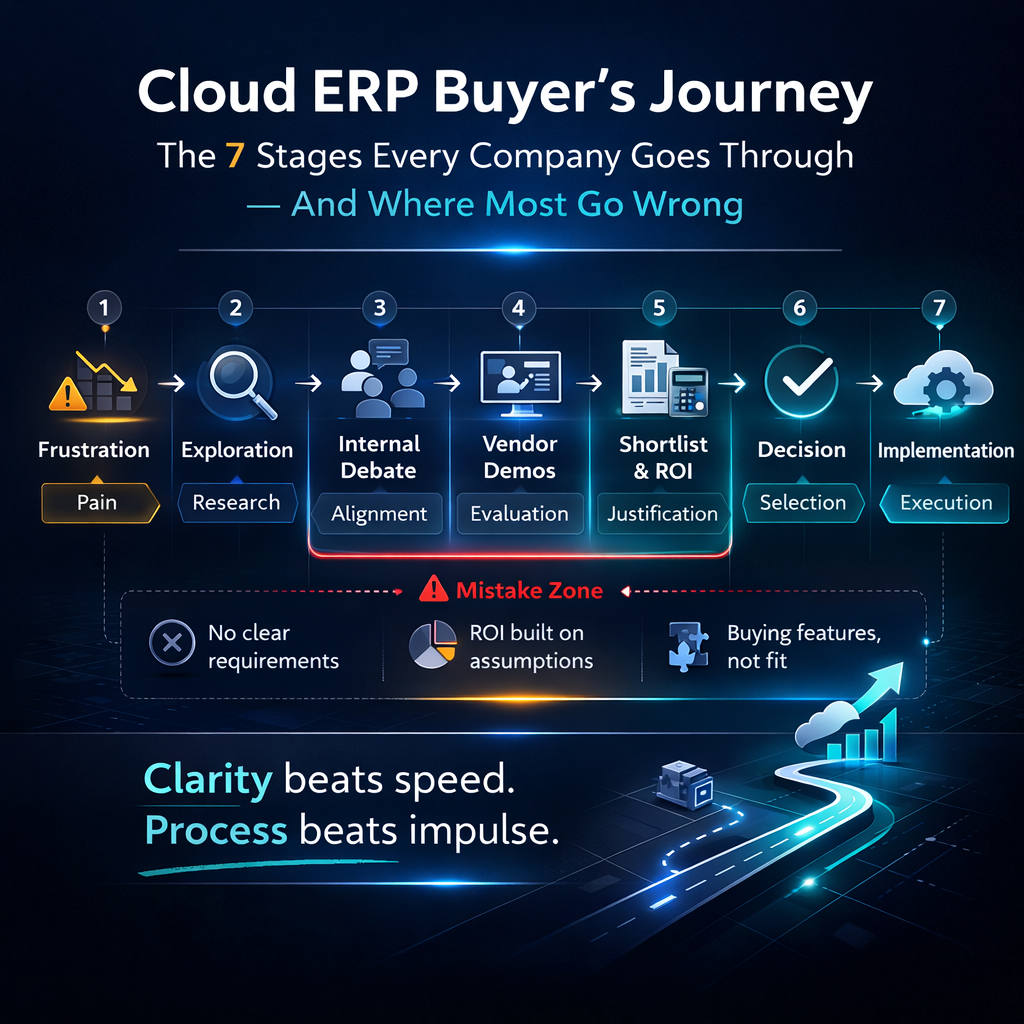
Cloud ERP Buyer’s Journey: The 7 Stages Every Company Goes Through (And Where Most Go Wrong)
Buying cloud ERP is one of the highest-stakes decisions a distribution company makes. The system you choose will run your operation for the next five to ten years. It will determine how fast you can ship, how accurately you can price, how clearly you can see your inventory, and how effectively you can scale. Get it right and the business operates at a level the current system can’t touch. Get it wrong and you’ve spent a year and a significant budget arriving at a different set of problems.
The challenge isn’t that companies make careless decisions. Most ERP evaluations are thorough, well-intentioned, and staffed with smart people. The challenge is that the buying process itself contains structural traps — moments where the way evaluations are traditionally conducted steers companies toward decisions that look sound in a conference room and fail in production.
These traps aren’t random. They follow a pattern. Nearly every company that buys ERP goes through the same seven stages, and the mistakes cluster at the same points in the journey. Understanding where those points are — before you reach them — is the most valuable preparation you can do.
This guide maps the full buyer’s journey, identifies where companies go wrong at each stage, and offers a different approach for each one.
Stage 1: The Trigger
What Happens
Nobody wakes up and decides to evaluate ERP for fun. Something triggers the process — a specific event or accumulation of pain that converts vague dissatisfaction into active evaluation.
Common triggers for distribution companies include a growth event that exposes system limitations — a new warehouse, a major customer win, an acquisition that doubles the operation’s complexity. Sometimes it’s a compliance trigger — a trading partner requiring EDI capabilities the current system can’t handle, or an audit that reveals data integrity problems. Sometimes it’s a vendor trigger — the legacy ERP vendor announcing end-of-life for the current version, or a price increase that forces a market comparison. And sometimes it’s simply the accumulation of daily friction reaching a tipping point — the warehouse manager who’s had enough of manual workarounds, the CFO who’s tired of month-end reconciliation marathons, the operations director who can see the gap between what the business needs and what the system delivers.
Where Companies Go Wrong
Letting the trigger define the scope. If the trigger was a warehouse problem, the evaluation focuses on warehouse management. If the trigger was a financial reporting limitation, the evaluation focuses on financial capabilities. The trigger opens the door, but if it also sets the boundaries, you end up evaluating a system-wide decision through a single-function lens.
The trigger is a symptom. The underlying condition is a platform that can’t support your operation at the level it requires. The evaluation should address the full condition, not just the symptom that made it impossible to ignore.
Waiting too long after the trigger. The trigger creates organizational energy and executive attention. That energy dissipates over time. Companies that wait months between the trigger event and the start of a formal evaluation lose the organizational momentum that makes the project possible. The daily crisis that prompted the conversation gets worked around. The urgency fades. The evaluation never starts, or starts with diminished sponsorship and stalls.
The Better Approach
When the trigger hits, use it to initiate a comprehensive evaluation — not a single-function assessment. Document not just the triggering problem but every operational limitation the current system imposes. Build the business case around the full scope of improvement, not just the trigger event. And move quickly — the organizational energy that follows a trigger is a resource that depreciates rapidly.
Stage 2: Internal Alignment
What Happens
Before the company can evaluate external options, it needs internal agreement that a change is necessary, that the investment is justifiable, and that the project has executive sponsorship. This stage involves building consensus among stakeholders — operations, finance, IT, and executive leadership — each of whom has different priorities, different concerns, and different definitions of success.
Operations wants a system that eliminates manual workarounds and provides real-time visibility. Finance wants cost justification and a clear return on investment. IT wants a platform that reduces their maintenance burden and integrates cleanly with the existing technology landscape. Executive leadership wants confidence that the investment will deliver competitive advantage without unacceptable risk.
Where Companies Go Wrong
Letting IT lead the initiative. This is the single most common structural error in ERP buying, and it shapes everything that follows. When IT leads, the evaluation criteria emphasize technical specifications — database architecture, hosting options, security certifications, API documentation — at the expense of operational fit. The demo audience is weighted toward technical evaluators rather than the people who use the system daily. The selection criteria favor platforms that satisfy IT’s concerns about infrastructure and integration while potentially overlooking whether the system actually handles the business’s operational complexity.
IT is essential to the evaluation. They bring critical expertise in data migration, integration architecture, security requirements, and technical due diligence. But the decision is fundamentally an operations decision. The system runs the business. The people who run the business should lead the selection.
Failing to build a complete business case. Internal alignment requires a compelling answer to “why now and why this much money?” A business case that only accounts for the subscription cost versus the current system’s license fee will lose the argument. A business case that quantifies the total cost of the current system — including workaround labor, consultant fees, error costs, IT maintenance, and opportunity cost — against the total cost of the new platform tells a very different story. The companies that secure organizational alignment are the ones that make the cost of inaction visible, not just the cost of action.
Seeking unanimous consensus. Waiting for every stakeholder to enthusiastically support the initiative is waiting forever. Someone will always have reservations. The goal isn’t unanimity — it’s sufficient alignment among the people who matter. An executive sponsor with the authority to make the decision, operational leaders who will champion adoption, and financial approval based on a sound business case. Consensus is desirable. Sponsorship is essential.
The Better Approach
Put operations in the lead from the start. Build a business case that quantifies the cost of the current system comprehensively — not just the obvious costs but the hidden ones. Secure executive sponsorship early, before organizational energy fades. And don’t wait for everyone to agree. Wait for the right people to commit.
Stage 3: Requirements Definition
What Happens
The company documents what the new system needs to do. This typically produces a requirements document — sometimes a formal RFP, sometimes a spreadsheet of capabilities, sometimes a narrative description of needs — that will guide the vendor evaluation.
Where Companies Go Wrong
Building requirements from the current system rather than the current operation. This is the most consequential mistake in the entire buyer’s journey, and it happens almost every time.
The natural approach is to start with what the current system does and add what it doesn’t. This produces a requirements document that’s essentially a description of the legacy system plus a wish list. It preserves every existing workflow — including the ones that exist only because the legacy system forced them — and adds new capabilities on top. The result is requirements that no system can satisfy without extensive customization, because the requirements include both genuine business needs and legacy system artifacts that nobody questioned.
The 500-line RFP. Formal RFPs with hundreds of line items — “does the system support X? yes/no” — generate responses that are useless for differentiation. Every vendor checks “yes” on nearly every line, because the questions are either so broad that anything qualifies or so specific that the vendor interprets them to match their product. You end up with five vendor responses that all look the same, and the actual differences — the ones that determine whether the system serves your operation — are invisible in the data.
Confusing features with outcomes. Requirements documents list features: “the system must support multi-location inventory.” They rarely specify outcomes: “the system must provide real-time available-to-promise calculations across all locations, enabling a salesperson to confirm delivery dates based on current network-wide inventory positions.” The feature exists in every ERP. The outcome depends on architecture, data model, and workflow integration that a feature checkbox can’t evaluate.
The Better Approach
Start with your operation, not your current system. Document the five to ten most critical business processes. For each one, describe what happens today — including all the manual steps, workarounds, and limitations — and what should happen in the future state. Define success in terms of outcomes: order-to-cash cycle time, percentage of orders processed without manual intervention, inventory accuracy, reporting turnaround, fulfillment speed. Let the vendor show you how their platform achieves those outcomes rather than checking whether features exist on a spreadsheet.
Keep the requirements document focused and outcome-oriented. Fifty well-defined process requirements tell you more than 500 feature checkboxes.
Stage 4: Vendor Evaluation
What Happens
The company identifies potential vendors, requests demonstrations, evaluates capabilities, and narrows the field. This is typically the longest stage and the one that consumes the most organizational attention.
Where Companies Go Wrong
Evaluating too many vendors. Companies routinely start with ten or more vendors in the initial consideration set, driven by analyst reports, web searches, peer recommendations, and the desire to be thorough. Evaluating ten vendors means ten demos, ten follow-up sessions, ten reference checks, and ten proposal reviews. The process takes months and produces evaluation fatigue that actually degrades decision quality — by the seventh demo, nobody can remember what they saw in the second one, and the evaluation becomes about which vendor made the strongest recent impression rather than which platform best fits the operation.
Three to five vendors is the right number for substantive evaluation. Use initial research to filter aggressively before the demo stage. Eliminate vendors whose architecture doesn’t match your requirements (cloud-native vs. migrated, multi-tenant vs. single-tenant). Eliminate vendors whose primary market isn’t your industry and size. Eliminate vendors whose implementation model doesn’t align with your preferences. Then evaluate the remaining candidates with the depth they deserve.
Watching the vendor’s demo instead of requiring yours. Standard vendor demos are rehearsed performances designed to showcase strengths and avoid weaknesses. The data is clean. The scenarios are selected for maximum visual impact. The workflows are the ones the system handles best. If you evaluate based on the vendor’s demo script, you’re evaluating their presentation skills, not their platform’s fit for your business.
Require every vendor to demonstrate your scenarios. Provide them with your actual workflows — your most complex order scenario, your trickiest pricing structure, your multi-location fulfillment challenge — and ask them to demonstrate how the platform handles each one. The vendors with genuine depth will welcome the challenge. The ones whose capabilities are shallower than their marketing will struggle, hedge, or try to redirect you back to their standard demo.
Over-weighting the user interface. Modern UIs are polished across most platforms. A beautiful interface that sits on top of a fragmented data architecture and shallow business logic will look better in a demo than a deep, purpose-built platform with a less flashy front end. The interface matters — your team will use it every day — but it should be a tiebreaker between platforms that are equally capable, not the primary selection criterion.
Ignoring the implementation model. Vendors demo the software. They rarely demo the implementation. But the implementation experience — who does it, how long it takes, what it costs, and how much of the vendor’s attention you get — is at least as important as the software itself. A great platform with a poor implementation produces a poor outcome. Ask detailed questions about who implements, what their process looks like, what the timeline is, and what happens after go-live. The answers are as important as anything you see on screen.
The Better Approach
Filter to three to five vendors before the demo stage. Provide your scenarios to every vendor and require them to demonstrate against your operational reality. Evaluate the implementation model with the same rigor you apply to the software. And weight your evaluation toward operational depth, data architecture, and implementation approach rather than interface aesthetics and feature count.
Stage 5: The Decision
What Happens
The evaluation is complete. The demos are done. The references are checked. The proposals are in. Now someone has to choose.
Where Companies Go Wrong
Deciding by committee without decision criteria. If the evaluation team sits in a room and debates which vendor to choose without pre-defined, weighted selection criteria, the decision devolves into a contest of persuasion and organizational politics. The loudest voice wins, or the most risk-averse voice vetoes, or the discussion loops without resolution until someone forces a call based on fatigue rather than analysis.
Choosing the safest-looking option rather than the best-fitting one. “Nobody ever got fired for buying SAP” captures a decision-making pathology that’s been costing mid-market companies for decades. The vendor with the biggest name, the longest client list, and the most analyst recognition feels safe — even when their platform is designed for companies ten times your size, their implementation model depends on consultants, and their mid-market track record is mediocre.
Safety in ERP selection isn’t the vendor’s brand. It’s the fit between the platform and your operation, the quality of the implementation model, and the vendor’s focus on your market. A mid-market distribution company is a priority customer for a vendor focused on mid-market distribution. That same company is a rounding error for a vendor whose strategic accounts are Fortune 500 enterprises. Which scenario is actually safer?
Letting the perfect be the enemy of the good. No platform will score perfectly on every criterion. Every option involves trade-offs. Companies that can’t accept trade-offs don’t make decisions — they defer, restart evaluations, add more vendors to the consideration set, or request custom demonstrations that delay the process by months. At some point, the available information is sufficient and the decision needs to happen. The cost of deferral — another year on the legacy system — is almost always higher than the cost of choosing between two capable options.
The Better Approach
Define your selection criteria before the demos start — architecture, industry fit, implementation model, five-year total cost of ownership, and operational depth — and weight them by importance to your business. Score each vendor against those criteria using input from the full evaluation team. Let the scoring drive the decision rather than the discussion. And when two options are close, weight the implementation model and the vendor’s industry focus more heavily than the feature comparison — because those factors predict your long-term experience more accurately than anything else.
Stage 6: Implementation
What Happens
The contract is signed. Now the system has to be configured, data migrated, integrations built, users trained, and the organization transitioned from the legacy platform to the new one.
Where Companies Go Wrong
Treating implementation as the vendor’s project. Implementation is a partnership. The vendor brings platform expertise. You bring business expertise. The best outcomes happen when both sides are deeply engaged. Companies that sign the contract and expect the vendor to deliver a finished system — without meaningful involvement from their own operations team — get a system configured to generic assumptions rather than their specific requirements.
Trying to replicate the legacy system. This is the implementation-stage version of the requirements mistake. The team, faced with the reality of a new system that works differently from the old one, pushes to make it look and behave like the legacy platform. Same screen layouts. Same workflow sequences. Same reports. This impulse is understandable — familiarity reduces anxiety — but it’s counterproductive. It consumes implementation effort on changes that don’t add value, potentially introduces configuration complexity that creates future maintenance burden, and prevents the team from experiencing the new platform’s native efficiency.
Configure for your genuine business requirements. Adopt the platform’s native approach for everything else. The adjustment period is temporary. The efficiency gain from a well-designed system running the way it was designed to run is permanent.
Underinvesting in data migration. Data migration is the highest-risk workstream in most implementations, and it’s the one most frequently underestimated. “We’ll just export and import” becomes weeks of data cleaning, mapping, transformation, and validation when the reality of messy legacy data meets the new system’s data quality standards. Start data migration early. Run trial migrations before go-live. Validate rigorously. And accept that data cleanup is real work that takes real time — budget for it accordingly.
Rushing training. Training that consists of a two-day overview of the entire system produces users who know what the system can do but not how to do their specific job in it. Role-specific training — where each user learns the workflows relevant to their daily role, practices with realistic scenarios, and builds confidence before go-live — produces dramatically better adoption and shorter time-to-proficiency.
The Better Approach
Commit your best operations people to the implementation team — not as occasional consultants, but as active participants in configuration decisions, testing, and validation. Resist the urge to replicate the legacy system. Invest properly in data migration, starting early and running multiple trial migrations. And invest in role-specific training that builds confidence rather than generic overviews that build awareness.
Stage 7: Post-Go-Live Optimization
What Happens
The system is live. Orders are processing. The warehouse is picking from the new platform. Invoices are generating. The legacy system is powered down. The implementation, by most definitions, is complete.
Except it isn’t. The first 90 days after go-live are when the system meets the full complexity of daily operations for the first time. Scenarios that didn’t come up in testing surface. Users discover workflows that could be more efficient. Configuration settings that made sense in theory need adjustment based on production experience. Reports that seemed comprehensive reveal gaps when real decisions need real data.
Where Companies Go Wrong
Declaring victory too early. The go-live date isn’t the finish line. It’s the starting line. Companies that disband the implementation team, shift vendor support to a standard ticketing queue, and move on to the next initiative miss the critical optimization window when the highest-value adjustments can be made.
Not measuring outcomes. If you defined success criteria during the evaluation — order-to-cash cycle time, fulfillment speed, manual intervention rates, inventory accuracy, monthly close duration — now is the time to measure against them. Companies that don’t measure can’t identify where the system is delivering value and where additional configuration or training could capture more.
Tolerating workarounds. Old habits die hard. If users discover a scenario the new system handles differently from what they expected, the temptation is to work around it the same way they worked around the legacy system — with a spreadsheet, a manual process, or a phone call. Every workaround that persists is a signal that either the system needs configuration adjustment or the user needs additional training. Neither problem resolves itself. Both need proactive identification and resolution.
Ignoring the feedback loop. The operations team — the people using the system every day — is your most valuable source of optimization insight. They know which workflows feel slow. They know which screens need adjustment. They know which reports are missing data. If there’s no structured process for capturing and acting on this feedback, the insights dissipate and the system stabilizes at a level below its potential.
The Better Approach
Plan for a 90-day optimization period after go-live with dedicated support — not standard ticketing, but engaged access to people who know your configuration. Measure outcomes against the success criteria you defined during evaluation. Hunt for workarounds actively and resolve them through configuration adjustment or training. And create a feedback mechanism that captures user insights and translates them into system improvements on an ongoing basis.
The best-run ERP operations never stop optimizing. The platform improves continuously through vendor updates. Your configuration should improve continuously through operational learning. The companies that extract the most value from cloud ERP are the ones that treat the system as a living tool that evolves with the business — not a fixed asset that depreciates after installation.
The Journey With Bizowie
Bizowie’s model was designed to produce better outcomes at every stage of this journey.
The trigger leads to an honest conversation about your operation — not a sales pitch, but a diagnostic that identifies where your current system is costing you and where a purpose-built distribution platform would change the equation.
Internal alignment is easier when the platform is purpose-built for your industry, implemented in weeks to months rather than years, and priced at a total cost of ownership that makes the business case straightforward.
Requirements definition is guided by our implementation team’s deep understanding of distribution operations — helping you distinguish genuine business requirements from legacy system artifacts that don’t deserve to survive the migration.
Vendor evaluation is where we invite scrutiny. Bring your scenarios. Bring your complexity. Bring the checklist. We built the platform for distribution, we implement it directly, and we’re confident in what it can do under examination.
The decision comes down to fit, and we believe our fit for mid-market distribution is unmatched — purpose-built, vendor-direct, continuously updated, and laser-focused on the market we serve.
Implementation is led by the team that built the software, on a timeline measured in weeks to months, with your operations team at the center of every decision. No consultants. No intermediaries. No 18-month death march.
Post-go-live optimization is supported by the same team that implemented your system — people who know your configuration because they built it, and who are invested in your success because that’s what our business depends on.
Start the journey with a conversation, not a commitment. Schedule a demo with Bizowie and see where you are in the buyer’s journey — and how a vendor built for distribution can help you navigate the rest of it without the mistakes that derail most evaluations.