
Looking for a Dynamics GP Alternative? Compare Bizowie
Microsoft Dynamics GP has run the books for thousands of mid-market companies for decades. Many manufacturers and distributors built their operations around it, usually with a set of add-ons for inventory, warehousing, manufacturing, and EDI.
That era is ending. Microsoft will end Dynamics GP product support, enhancements, and tax updates on December 31, 2029, with security updates available until April 30, 2031, and it is encouraging GP customers to move to Dynamics 365 Business Central.
Every GP customer now has to choose what comes next. For manufacturers and distributors, the important question is not just “which system replaces GP,” but whether the replacement should look like GP plus add-ons again, or like a single platform where production, inventory, the warehouse, EDI, and financials work from the same transactions.
Bizowie is a cloud ERP platform built for mid-market manufacturers and distributors, implemented directly by the Bizowie team.
What Is Happening to Dynamics GP?
According to Microsoft:
- December 31, 2029: Dynamics GP support ends for product enhancements, regulatory (tax) updates, and technical support. Microsoft moved this date from the previously announced September 30, 2029, so customers can meet payroll and tax obligations for the full year.
- April 30, 2031: security updates, if needed, end.
- Recommended path: Microsoft is encouraging GP customers to transition to Dynamics 365 Business Central.
For U.S. companies, the end of tax updates matters most. Payroll and regulatory changes after 2029 will not be built into GP, so staying on it past that point means taking on that work, or that risk, yourself.
Your Three Realistic Options
1. Stay on GP for Now
GP keeps running after 2029. Some companies will stay until the last practical moment. The trade-off is that every year closer to the deadline leaves less time to choose and implement carefully, and partner and consultant capacity will be in demand as the date approaches.
2. Move to Dynamics 365 Business Central
Business Central is Microsoft’s recommended destination, with migration tools for GP data. It is a different product, not an upgrade: processes, reports, and add-ons generally have to be re-implemented, and the add-ons you rely on today may or may not have Business Central equivalents.
3. Evaluate the Market From a Clean Sheet
Because a move to Business Central is a reimplementation anyway, many GP customers treat this as a full evaluation. For manufacturers and distributors, that means comparing Business Central with platforms where manufacturing, warehouse management, and EDI are central rather than added.
If You Run Dynamics AX or NAV
GP is not the only Microsoft ERP being retired:
- Dynamics AX 2012 R3: extended support ended on January 10, 2023. Companies still on AX are already running unsupported software. Microsoft’s path for AX customers is Dynamics 365 Finance and Supply Chain Management.
- Dynamics NAV 2018: extended support ends on January 12, 2028. Microsoft’s path for NAV customers is Business Central.
The same decision applies to both: follow Microsoft’s recommended product, or treat the move as an open evaluation.
When Should You Move?
Work backward from December 31, 2029, not forward from today. A realistic plan allows time for:
- Selection: defining requirements, running scenario-based demonstrations, and negotiating.
- Implementation: configuration, data migration, integrations, testing, and training.
- A clean cutover: ideally at the start of a fiscal period, with time after go-live to stabilize before the deadline, not at year-end.
Move sooner if GP or its add-ons are already holding the business back, for example with multiple warehouses, EDI requirements, ecommerce, or manufacturing that has outgrown the add-ons; if an acquisition or new facility is coming; or if the people who know your GP environment best may leave.
Waiting is more reasonable if GP supports your operations well today and other major projects need management attention first. Even then, start the evaluation early, because partner and consultant capacity will tighten as the deadline approaches.
What Makes Leaving GP Hard
Data
Years of GP history are valuable, but not all of it needs to move. Most companies bring over opening balances, open transactions (orders, invoices, purchase orders), and clean master data: items, customers, vendors, price lists, bills of material, and lot and serial records still in inventory. Detailed history is often archived and kept available read-only rather than converted. Item and customer cleanup is usually the largest single task. See ERP data hygiene.
Integrations
Ecommerce, shipping, EDI, CRM, payment, and reporting connections built for GP generally have to be rebuilt for any new system. Each one is a chance to retire an integration entirely if the new platform does that job natively.
Add-Ons and Customizations
Every add-on and customization should be listed and classified: replaced by native functionality, replaced by a new app, rebuilt, or retired. This list often decides which platform makes sense.
Knowledge
Long-running GP environments often depend on a few people who know why things were set up the way they were. Document the important workflows and exceptions before the project starts, not during it.
Bizowie vs. Dynamics 365 Business Central at a Glance
Since Business Central is the default path for GP customers, this is the comparison most will make.
| Area | Bizowie | Dynamics 365 Business Central |
|---|---|---|
| Primary market | Mid-market manufacturing and distribution | Small and midsize businesses across many industries |
| Platform approach | Unified platform with manufacturing, WMS, EDI, and financials operating in one environment | Business management suite, extended through partner and AppSource apps |
| Manufacturing | Make-to-stock, make-to-order, engineer-to-order, assembly, and process, in one system | Manufacturing capabilities included with the Premium license |
| Distribution | Multi-location inventory, customer-specific pricing, integrated barcode WMS, and direct ANSI X12 EDI | Inventory and warehouse management included; EDI typically added through third-party apps |
| Planning | MRP and replenishment planning within the core platform | Supply planning within the product |
| Shop floor | Shop floor data collection to replace paper travelers | Depends on license tier and apps in the proposal |
| Licensing | Subscription; ask for pricing against your own scenario | Per-user subscription in Essentials and Premium tiers |
| Implementation | Vendor-direct implementation by the Bizowie team | Microsoft partners |
| Customization | Configuration, no-code platform capabilities, and workflows | Extensions and AppSource apps, built and maintained by partners or ISVs |
| Potential best fit | Manufacturers and distributors that want production, warehouse, EDI, and finance in one platform with one accountable vendor | Organizations that want to stay in the Microsoft ecosystem and work with a Microsoft partner |
This comparison reflects publicly available vendor information reviewed in October 2026. Product capabilities, licensing, and pricing can change. Buyers should validate their specific requirements directly with each vendor.
See Bizowie in Action
Real screens from Bizowie, not mockups. Click any screen to enlarge.
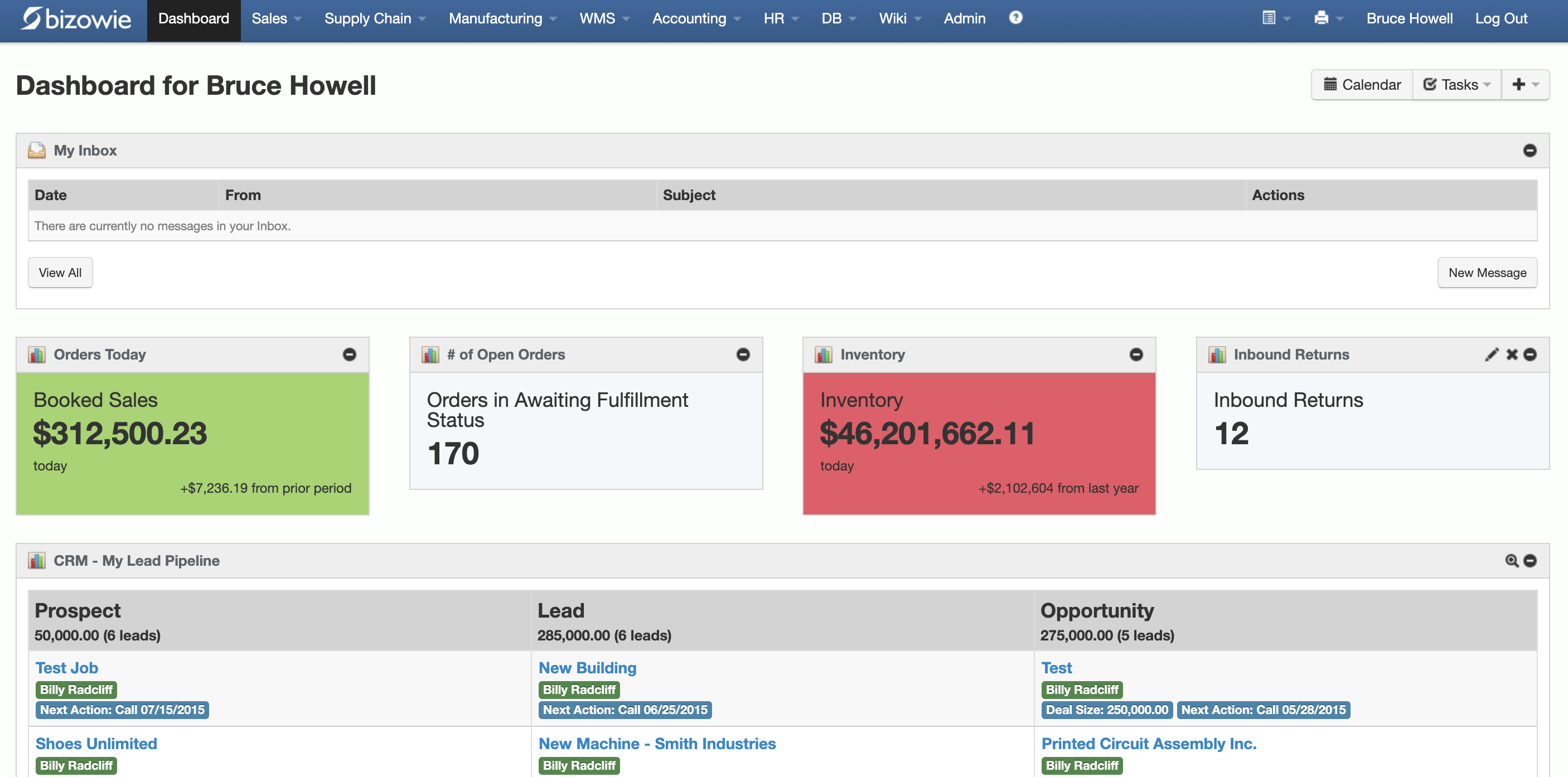
Live Dashboard
Bookings, open orders awaiting fulfillment, and inventory value at a glance.
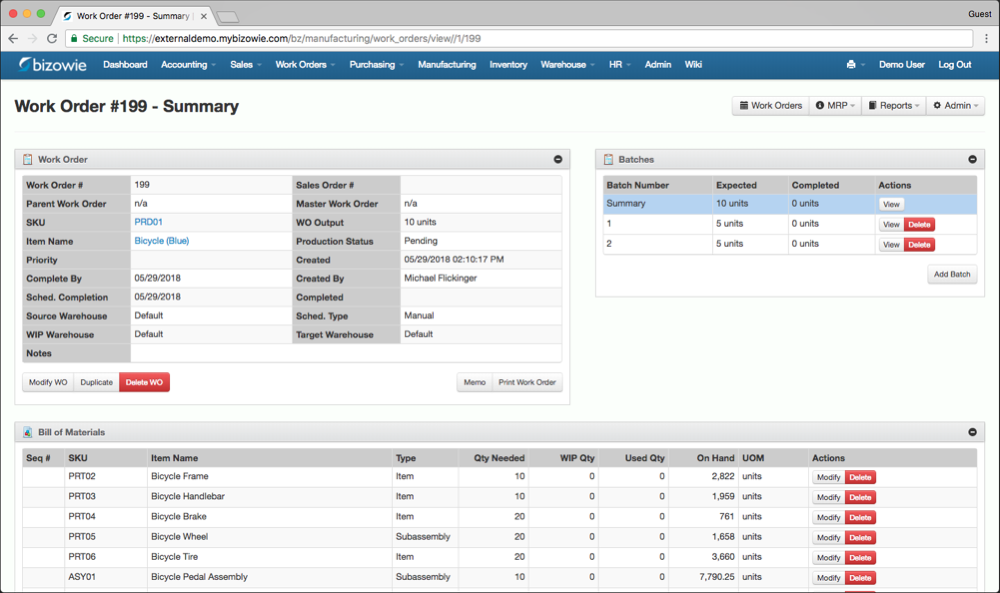
Work Orders & BOMs
Each work order carries its multi-level bill of materials, batches, and live on-hand quantities.
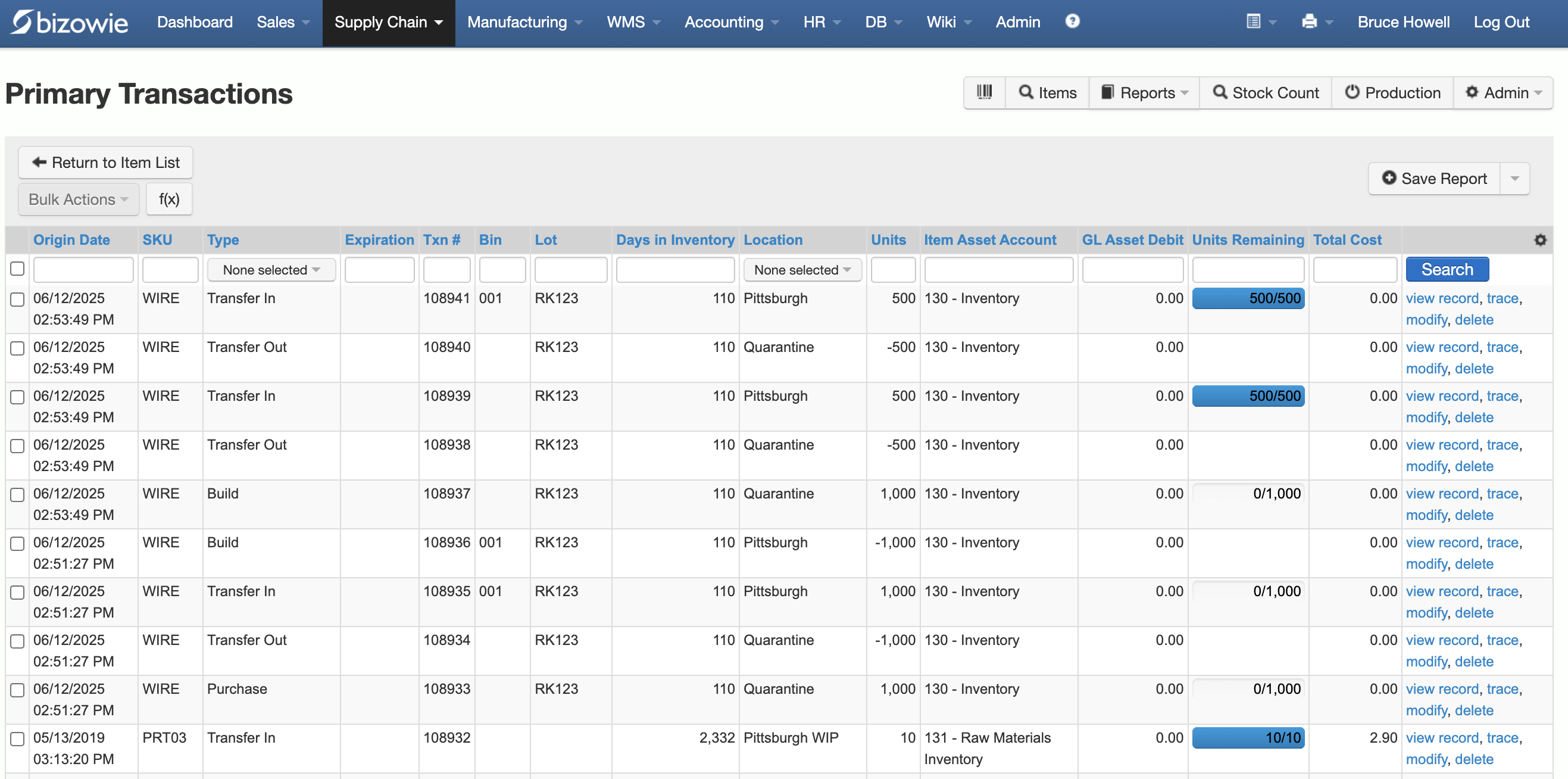
Inventory Transactions
Every receipt, transfer, build, and quarantine move by SKU, lot, bin, and location.
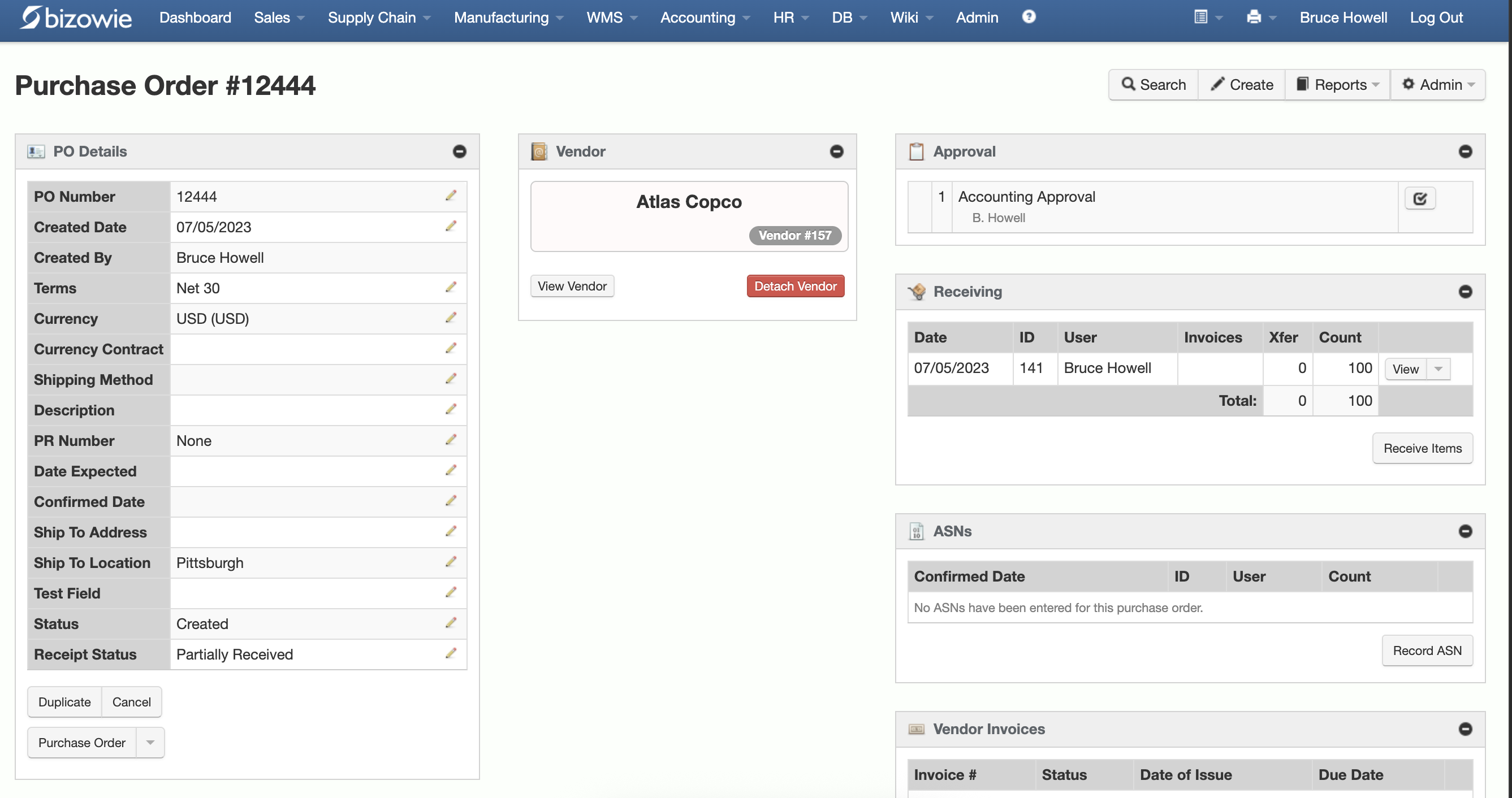
Purchasing & Receiving
Purchase orders with approvals, receiving, ASNs, and vendor invoices on one screen.
The Add-On Question
Most manufacturers and distributors on GP do not run GP alone. A typical environment includes some combination of:
- An inventory or warehouse management add-on with barcode scanning
- A manufacturing or MRP add-on
- An EDI provider and mapping service
- A shipping or carrier integration
- A sales tax, CRM, or ecommerce connector
- Custom reports and integrations built by a partner
Each one has its own vendor, contract, upgrade cycle, and support line. Moving off GP means asking, for every one of them: does it exist on the new platform, who maintains it, what does it cost, and how is data kept in sync?
That inventory is often the clearest argument for a platform where those functions are native. In Bizowie, warehouse management, EDI, manufacturing, and financials run in the same platform, so there is no integration between them to maintain.
Manufacturing Depth: Make Them Run Your Scenarios
Ask each vendor to run your own production scenarios, live, using only what is in their proposal:
- Release an engineering change to a component used on open work orders
- Insert a rush job into a loaded schedule and show what it displaces
- Report labor and quantity from the shop floor without supervisor rekeying
- Scrap units at an intermediate operation and show where the cost lands
- Close a job and explain its variance against the estimate
- Trace a raw material lot to every customer who received it
For more, see our manufacturing ERP software buyer’s guide.
“From our first contact all the way through to our implementation, Bizowie has been a first class organization to work with… We strongly recommend the Bizowie software program.”
Alan Seymour — President, Cleveland Electric Labs
Distribution Depth: Make Them Run Your Orders
- Take an EDI purchase order from a major customer through to an invoice without rekeying
- Price an order for a customer with contract pricing, quantity breaks, and a promotion
- Allocate limited stock across competing orders and two warehouses
- Receive a purchase order, put it away by scanner, then pick, pack, and ship an order
- Show true margin on an order after freight, landed cost, and rebates
Ask which of these are native, which need a separate app, and who supports each one. For more, see our distribution ERP software buyer’s guide.
“We have seen immediate economic benefit for our business in terms of productivity from our warehouse staff, eliminated processing errors, and better stock control.”
Julius Hart — Managing Director, LensesOnline
When Business Central May Be the Right Choice
Business Central may be the better fit if:
- Staying in the Microsoft ecosystem is a priority
- You have a GP partner you trust who will also implement Business Central
- Your operations are mostly financial, with lighter manufacturing or warehouse requirements
- The apps you need for your industry are available and supported on AppSource
When Bizowie Deserves Serious Consideration
Bizowie deserves a close look if:
- Manufacturing or distribution is the center of your business, not one function among many
- Your GP environment depends on several add-ons for inventory, warehouse, manufacturing, or EDI
- You want shop floor and warehouse staff working in the system, not on paper
- You want one company accountable for the software, the implementation, and support
- You would rather configure a platform than maintain custom extensions
12 Questions to Ask Before Replacing Dynamics GP
- Which of our GP add-ons have an equivalent on the new platform, and who supports them?
- Which requirements are native, and which need an extension or third-party app?
- How many users need licenses, including warehouse and shop floor staff, and at what tier?
- What will we pay at first and second renewal, including apps?
- Who implements the system, and who supports it after go-live?
- How much GP history will we bring over, and how?
- How will our custom reports and integrations be rebuilt?
- How does the system handle our hardest pricing, allocation, or production scenario?
- How are EDI orders received, processed, and invoiced?
- How do operators and warehouse staff record transactions, and on what devices?
- What is a realistic go-live date, working back from December 2029?
- Can we speak with a manufacturer or distributor that moved off GP?
Frequently Asked Questions
When does Dynamics GP support end?
Microsoft will end Dynamics GP support for product enhancements, tax updates, and technical support on December 31, 2029. Security updates, if needed, will be available until April 30, 2031.
Will Dynamics GP stop working after 2029?
No. GP will keep running, but without new tax and regulatory updates, product fixes, or Microsoft technical support. Companies that stay take on the risk of running unsupported software, particularly for payroll and tax.
What about Dynamics AX and NAV?
Dynamics AX 2012 R3 extended support ended on January 10, 2023, and Dynamics NAV 2018 extended support ends on January 12, 2028. Microsoft points AX customers to Dynamics 365 Finance and Supply Chain Management and NAV customers to Business Central.
Is Business Central an upgrade from GP?
No. Business Central is a different product. Microsoft provides tools to migrate GP data, but processes, reports, customizations, and add-ons generally need to be re-implemented.
What is the best alternative to Dynamics GP for manufacturers and distributors?
It depends on how central manufacturing, warehouse management, and EDI are to your business. Companies whose GP environment relies on several operational add-ons should compare Business Central with platforms where those functions are native, using their own scenarios.
How long does it take to replace Dynamics GP?
It depends mostly on data, add-ons, and integrations. Allow time for selection as well as implementation, and plan to be live well before December 2029 rather than at the deadline.
Can Bizowie replace Dynamics GP and its add-ons?
For many mid-market manufacturers and distributors, yes. The right way to find out is to bring your own scenarios to a demonstration: a representative order with your pricing, a warehouse workflow, an EDI transaction, or a production job.
Evaluate Your Next ERP From a Clean Sheet
Leaving GP is a reimplementation whichever way you go. That makes it the right moment to choose the platform that fits how your business works today, not the one that most resembles the system you are leaving.
Bring us your hardest order or production scenario. We’ll show you how Bizowie handles it, and if we are not the right fit, we will tell you.
See if Bizowie fits your operation
A real person will reply within one business day with an honest assessment, not a sales pitch.
- We review your submission personally.
- No automated email sequences.
- If we’re not the right fit, we’ll tell you.
Prefer to talk?
Call (888) 635-2517, Mon–Fri, 9 AM–5 PM Eastern
Other comparisons: Sage 100, NetSuite, Acumatica, Prophet 21, and outgrowing QuickBooks. See all on our switching ERP page.
Product information sources: Bizowie Cloud ERP for Manufacturers, Bizowie Cloud ERP for Distributors, Microsoft's Dynamics GP lifecycle policy, Dynamics AX 2012 R3 and Dynamics NAV 2018 lifecycle pages, end of support announcement, and Business Central licensing guidance.
Microsoft, Dynamics, Dynamics GP, Dynamics AX, Dynamics NAV, and Dynamics 365 are trademarks of the Microsoft group of companies. Bizowie is not affiliated with, sponsored by, or endorsed by Microsoft. This comparison is based on publicly available information and is intended to support independent evaluation.